
CVE Manager
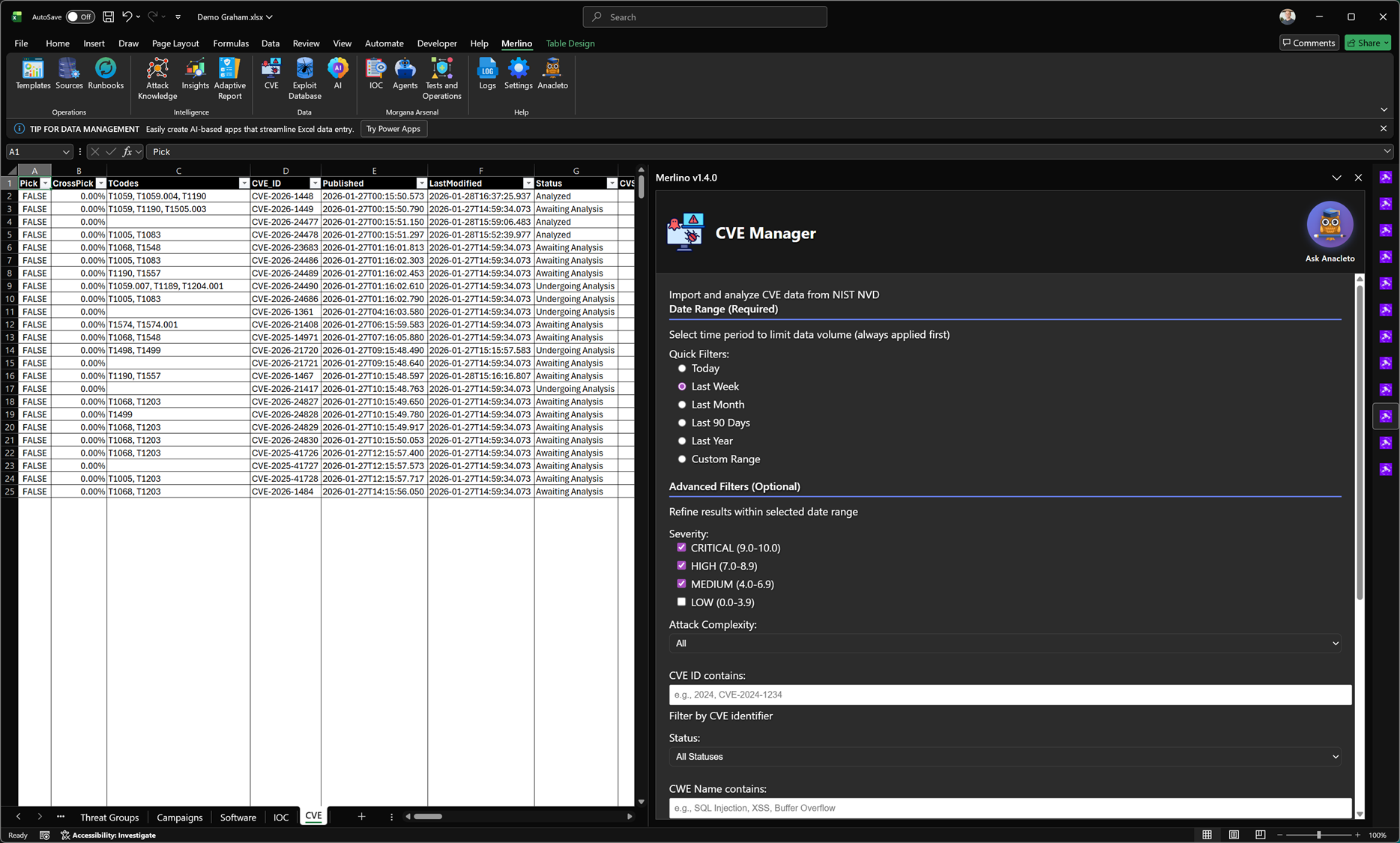
CVE Manager
CVE Manager imports vulnerability data from official sources and converts it into an actionable workflow inside Merlino. It supports advanced filtering, CTI enrichment, cross-dataset correlation, and validation planning—so CVEs are not just tracked, but operationally assessed against your environment and defensive posture.
What it does
CVE Manager is designed to make vulnerability intelligence practical. It allows you to pull in CVE records, structure them in Merlino tables, and immediately analyze them in context: affected software, severity, timelines, exploitability signals, and relationships to threat activity and ATT&CK techniques. This reduces manual effort and keeps CVE analysis aligned with what you can validate and defend.
Official data import
CVE Manager can import and normalize CVE data from official sources (for example NIST NVD feeds) into the workbook. A required date range selector limits volume and keeps ingestion efficient. Optional filters allow you to narrow down results before analysis.
Date range (required)
- Quick ranges: Today, Last Week, Last Month, Last 90 Days, Last Year.
- Custom range: define an exact time window for targeted investigations.
Advanced filters (optional)
- Severity: filter by CVSS ranges (e.g., Critical, High, Medium, Low).
- Attack complexity: narrow results based on exploit difficulty signals.
- CVE ID match: search by CVE identifier or partial value.
- Status: track workflow state (e.g., Awaiting Analysis, Undergoing Analysis, Analyzed).
- CWE text match: filter by vulnerability class keywords (e.g., SQLi, XSS, buffer overflow).
CTI enrichment and cross-analysis
CVE Manager is built for correlation. Imported CVEs can be linked to MITRE context and other Merlino entities, enabling advanced CTI-driven analysis across the workbook. This makes it possible to move from vulnerability lists to insight: which vulnerabilities are relevant to active threat patterns, what techniques they enable, and how they intersect with your environment.
- CVE ↔ Technique mapping: connect vulnerabilities to the tactics and techniques they may enable.
- CVE ↔ Software / platform context: align CVEs with the software estate you actually run.
- CVE ↔ Threat activity: relate CVEs to threat groups, campaigns, tools, or known exploitation patterns.
- CVE ↔ Coverage signals: assess whether relevant detections, telemetry sources, and tests exist for the exposure.
Validation and red teaming workflows
CVE Manager supports operational validation by linking CVEs to tests and red teaming activities. This enables a structured cycle: identify exposure → plan validation → execute tests → measure results → confirm remediation effectiveness. By connecting validation evidence back to the CVE record, you can demonstrate whether patching, hardening, and controls are truly adequate.
- Test planning: associate CVEs with specific validation tests in the Merlino catalogue.
- Execution tracking: capture results and evidence for whether exploitation conditions still exist.
- Control verification: confirm that patching and compensating controls (segmentation, hardening, detection) work as expected.
- Repeatability: re-run validation after changes and track posture improvements over time.
Why it matters
Vulnerability management often fails when CVEs are treated as isolated items. CVE Manager keeps CVEs connected to threat context, ATT&CK techniques, and measurable defensive readiness. This reduces noise, improves prioritization, and supports defensible decisions based on evidence rather than assumptions.
Typical outcomes
- Faster triage: narrow large CVE volumes using strong filters and workflow status.
- Better prioritization: focus on vulnerabilities that align with active threats and relevant techniques.
- Operational assurance: validate whether remediation and controls are effective through structured testing.
- Clear reporting: maintain an auditable trail from CVE import to analysis, validation, and outcome.
Note: CVE Manager is methodology-driven and integrates into Merlino’s broader intelligence and validation workflows. It does not replace vulnerability scanners; it connects vulnerability data to threat context, defensive coverage, and validation evidence within the workbook.