
Install Merlino in Excel

Merlino is available on the Microsoft Office Add-ins Marketplace. Installation takes less than a minute.
  • Important -- Compatibility Notice
  • Merlino leverages advanced features of the Office.js library that require a modern Excel runtime. For the best experience, Microsoft 365 (Office 365) is strongly recommended. If you are using an older version of Excel (2019 or 2021), make sure it has the latest updates and patches installed before adding Merlino -- go to File > Account > Update Options > Update Now and restart Excel before proceeding.

  • Open Excel -- Launch Microsoft Excel on your desktop (Windows or Mac) or open Excel on the web (Office 365).
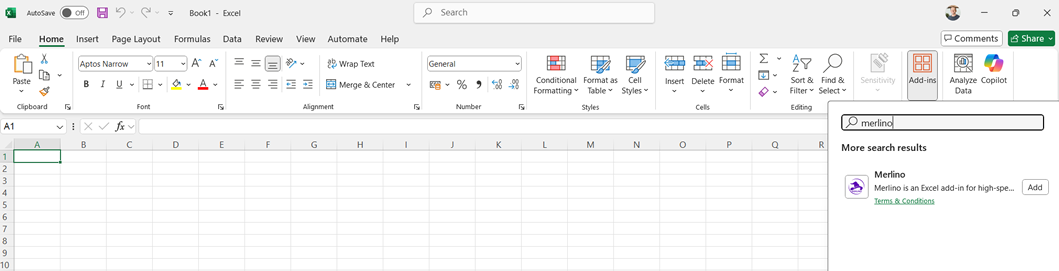
  • Go to Add-ins -- Click the Insert tab in the ribbon, then click Get Add-ins (or My Add-ins on older versions).
  • Search for Merlino -- In the Office Add-ins dialog, type Merlino in the search bar and press Enter.
  • Click Add -- Find Merlino in the results and click Add. Accept the license terms when prompted.
  • Restart Excel -- Close and reopen Microsoft Excel to ensure the add-in loads correctly.
  • Start Using Merlino -- The Merlino tab appears in your Excel ribbon. Click it to access all features -- Templates, Sources, AI, Tests & Operations, IOC, Reports, and more.


Community and Support - Camelot

Camelot is the official community hub for the Merlino and Morgana Arsenal ecosystem. It is hosted on GitHub and is your one-stop destination for documentation, discussions, troubleshooting, feature requests, and collaboration with other cybersecurity professionals.

  • Discussions -- Ask questions, share ideas, report issues, and connect with the community.
  • Q&A -- Get answers from maintainers and community members.
  • Troubleshooting -- Technical issues, bug reports, and diagnostic help.
  • Ideas -- Suggest features, improvements, and new integrations.

Hands-On Laboratories

Camelot includes three complete, step-by-step laboratories that guide you through the vast majority of Merlino's features and functionality. Each lab builds on the previous one, forming a complete security validation workflow -- from threat intelligence, through detection measurement, to Red Team execution and IOC analysis.

Go to Camelot

Videos and Feature Overview

Merlino is free. If it helps you, consider sponsoring the project.

One tool. One developer. Zero subscription fees. Your support keeps it alive and growing.
Donate