
Agents Intelligence
Agents Intelligence
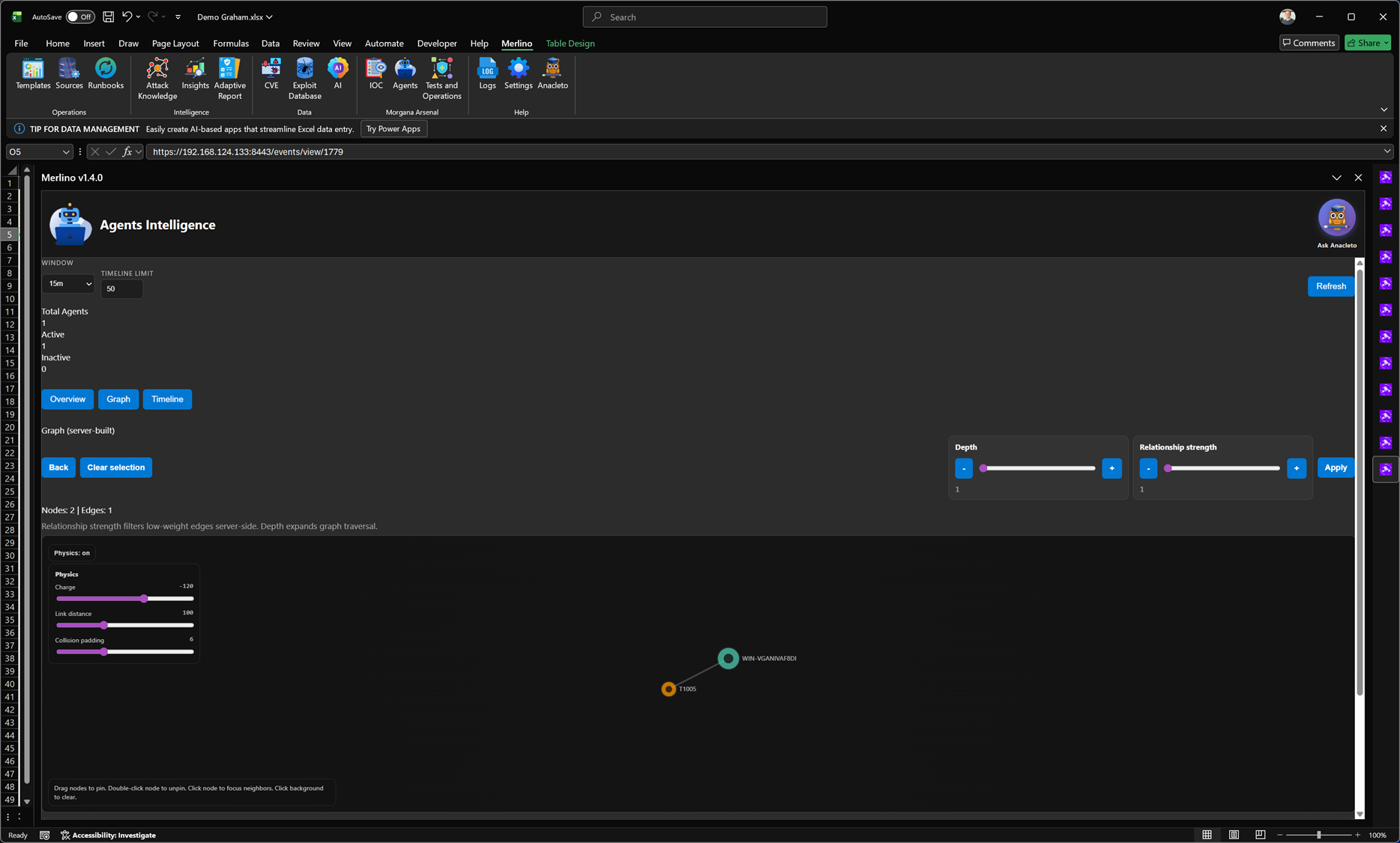
Agents Intelligence is the monitoring and relationship view for your execution agents. It shows agent status (active/inactive), recent activity, and the connections between agents, operations, and abilities so you can validate that your test infrastructure is healthy before relying on operational outcomes for posture metrics.
What it does
Adversary emulation depends on reliable agents running on target systems. Agents Intelligence centralizes visibility into those agents: how many are connected, which ones are currently active, and whether they have produced events within the selected time window. It also provides an interactive graph view to explore relationships and dependencies across the execution layer.
Status and time window controls
The report supports a configurable monitoring window so you can focus on recent activity and avoid stale interpretations. With a single refresh, Merlino pulls the latest agent state and related events.
- Window: select the time window used to evaluate recent agent activity (e.g., last 15 minutes).
- Timeline limit: limit event volume for faster rendering and clearer signal.
- Refresh: pull the latest agent status and event data from the execution environment.
Agent summary
Agents Intelligence provides a quick summary of the agent population:
- Total agents: the number of agents currently known to the system.
- Active agents: agents that are connected and producing recent activity in the selected time window.
- Inactive agents: agents that are disconnected or have not produced recent events.
Relationship graph (server-built)
The graph view visualizes how agents relate to the operational layer. Nodes represent agents and connected entities (such as operations, abilities, or targets, depending on the available telemetry), and edges represent meaningful relationships. You can adjust the graph depth and relationship strength to reduce noise and focus on the most relevant connections.
- Depth: expand how far the graph traverses relationships from the selected node.
- Relationship strength: filter low-weight edges to focus on stronger, more meaningful connections.
- Interactive exploration: click to focus neighbors, drag to pin nodes, and clear selection to reset focus.
Why it matters
Agent health is a prerequisite for trustworthy validation. If agents are inactive, stalled, or unstable, test outcomes may be incomplete or misleading. Agents Intelligence helps you detect these conditions early, reduce execution downtime, and maintain confidence that operations are producing reliable evidence.
Typical uses
- Pre-run checks: confirm that required agents are online before launching an operation.
- Live monitoring: detect stalled or disconnected agents during execution.
- Post-run review: verify that results are backed by real agent activity in the expected time window.
- Troubleshooting: identify which agents are linked to failing operations or missing telemetry.
Note: Agents Intelligence reflects the execution layer state within the selected time window. Always refresh before making operational decisions to avoid acting on stale data.