
Merlino Features (Quick Overview) (Click on the image for more details)
Templates (MITRE Posture Baseline)
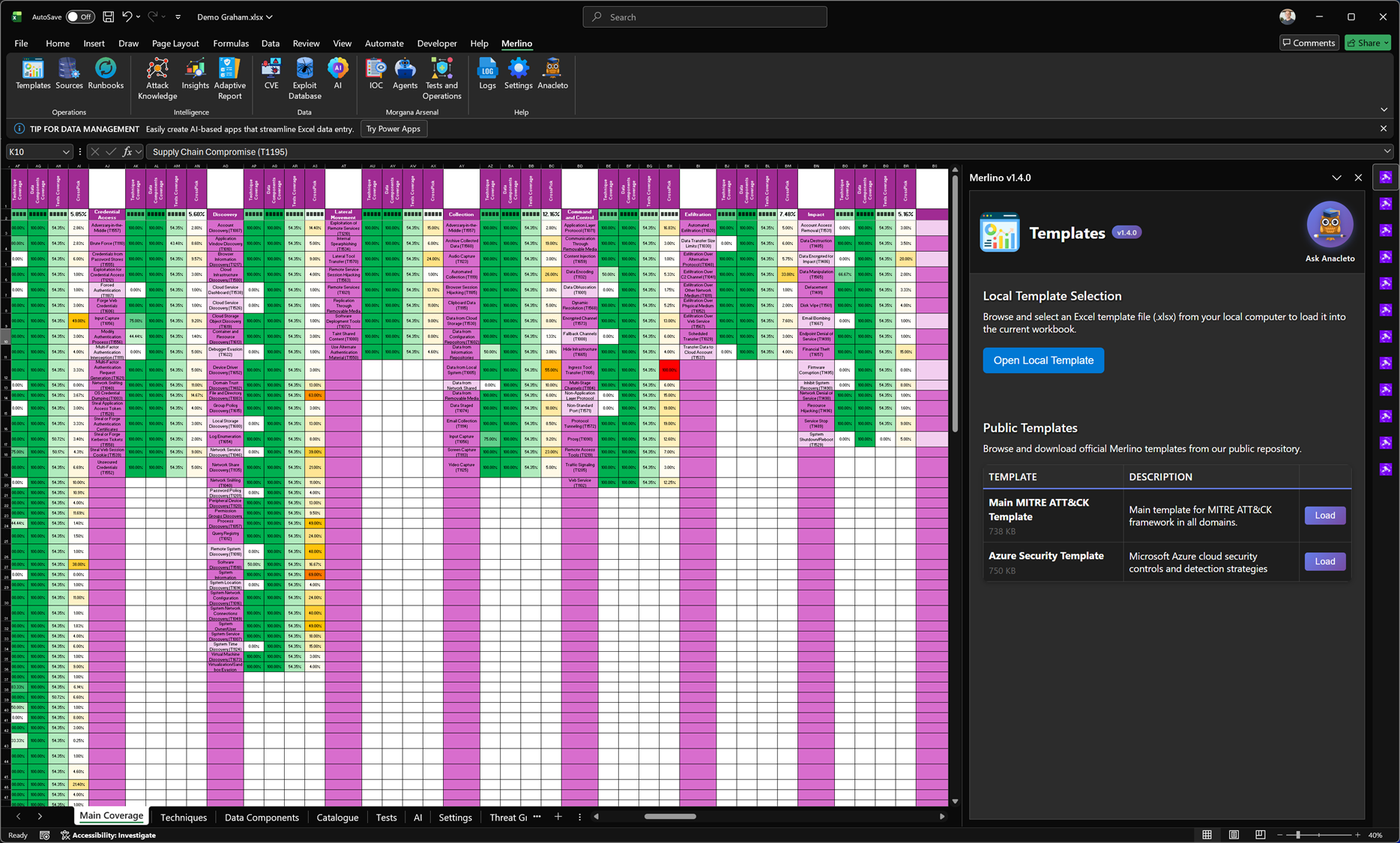
The Templates feature is the fastest way to bootstrap a complete Merlino workbook using a curated, ready-to-use Excel baseline. Templates provide a structured starting point for MITRE ATT&CK coverage/posture, so you can move immediately from “empty workbook” to a measurable, working framework. Merlino templates are not static spreadsheets: they are designed to be the foundation of an operational methodology, enabling consistent assessment, validation, and reporting.
The Templates feature is the fastest way to bootstrap a complete Merlino workbook using a curated, ready-to-use Excel baseline. Templates provide a structured starting point for MITRE ATT&CK coverage/posture, so you can move immediately from “empty workbook” to a measurable, working framework. Merlino templates are not static spreadsheets: they are designed to be the foundation of an operational methodology, enabling consistent assessment, validation, and reporting.
Sources (Data Import & Intelligence Enrichment)
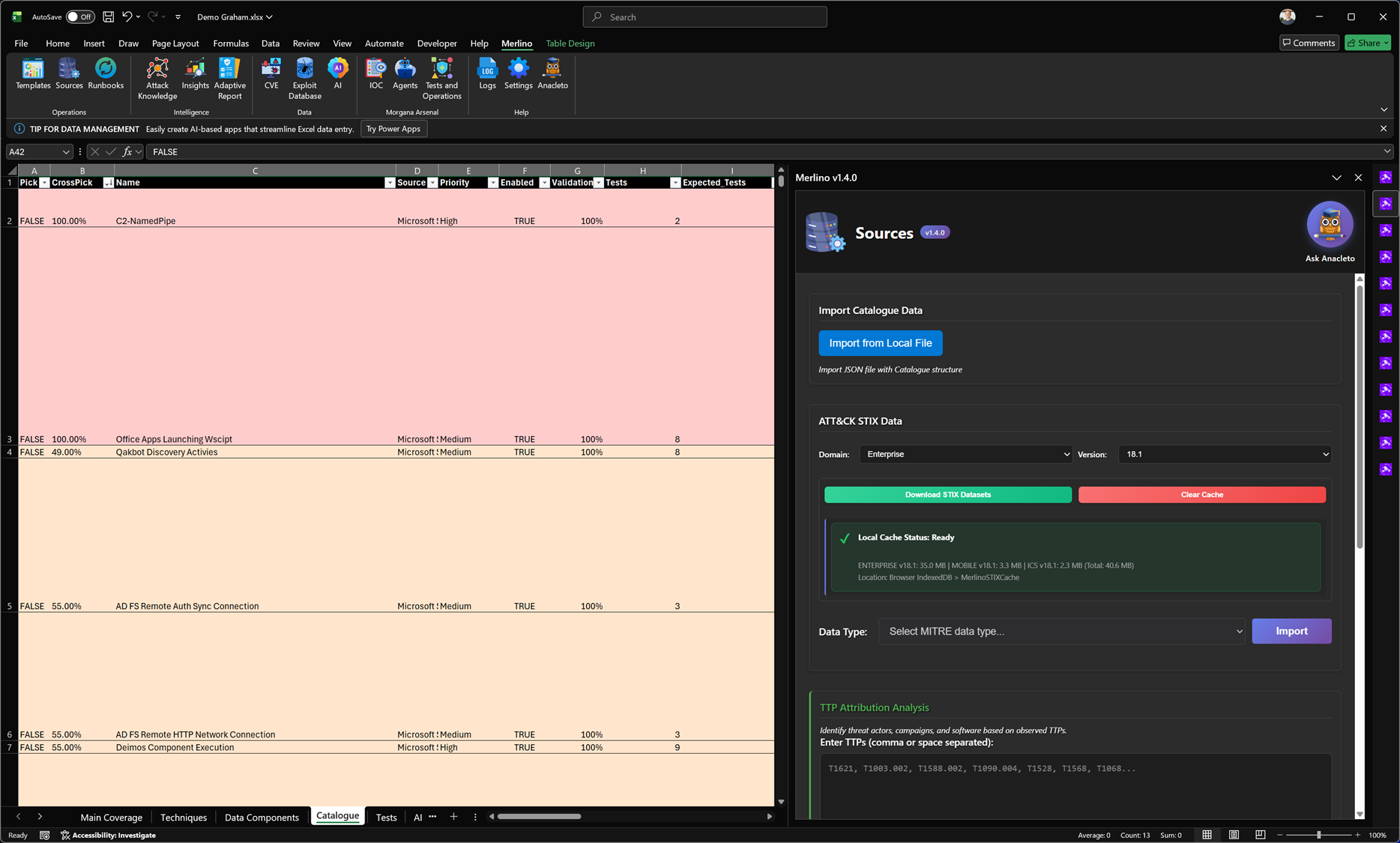
The Sources module is where Merlino builds the data foundation for every posture view, coverage analysis, and validation workflow. From here you can download and import MITRE ATT&CK STIX datasets (by domain and version), using local caching to keep imports fast and repeatable. Sources also supports importing structured catalogue data from security platforms such as Microsoft Sentinel, Dynatrace, Intune, and other integrations (new sources are added periodically). In addition, Merlino can run dynamic TTP Attribution: provide a list of technique IDs and Merlino uses heuristic analysis to suggest likely CTI context from MITRE (threat groups, campaigns, software) to speed up investigation and prioritisation.
The Sources module is where Merlino builds the data foundation for every posture view, coverage analysis, and validation workflow. From here you can download and import MITRE ATT&CK STIX datasets (by domain and version), using local caching to keep imports fast and repeatable. Sources also supports importing structured catalogue data from security platforms such as Microsoft Sentinel, Dynatrace, Intune, and other integrations (new sources are added periodically). In addition, Merlino can run dynamic TTP Attribution: provide a list of technique IDs and Merlino uses heuristic analysis to suggest likely CTI context from MITRE (threat groups, campaigns, software) to speed up investigation and prioritisation.
Runbooks (Automated Internal Processes)
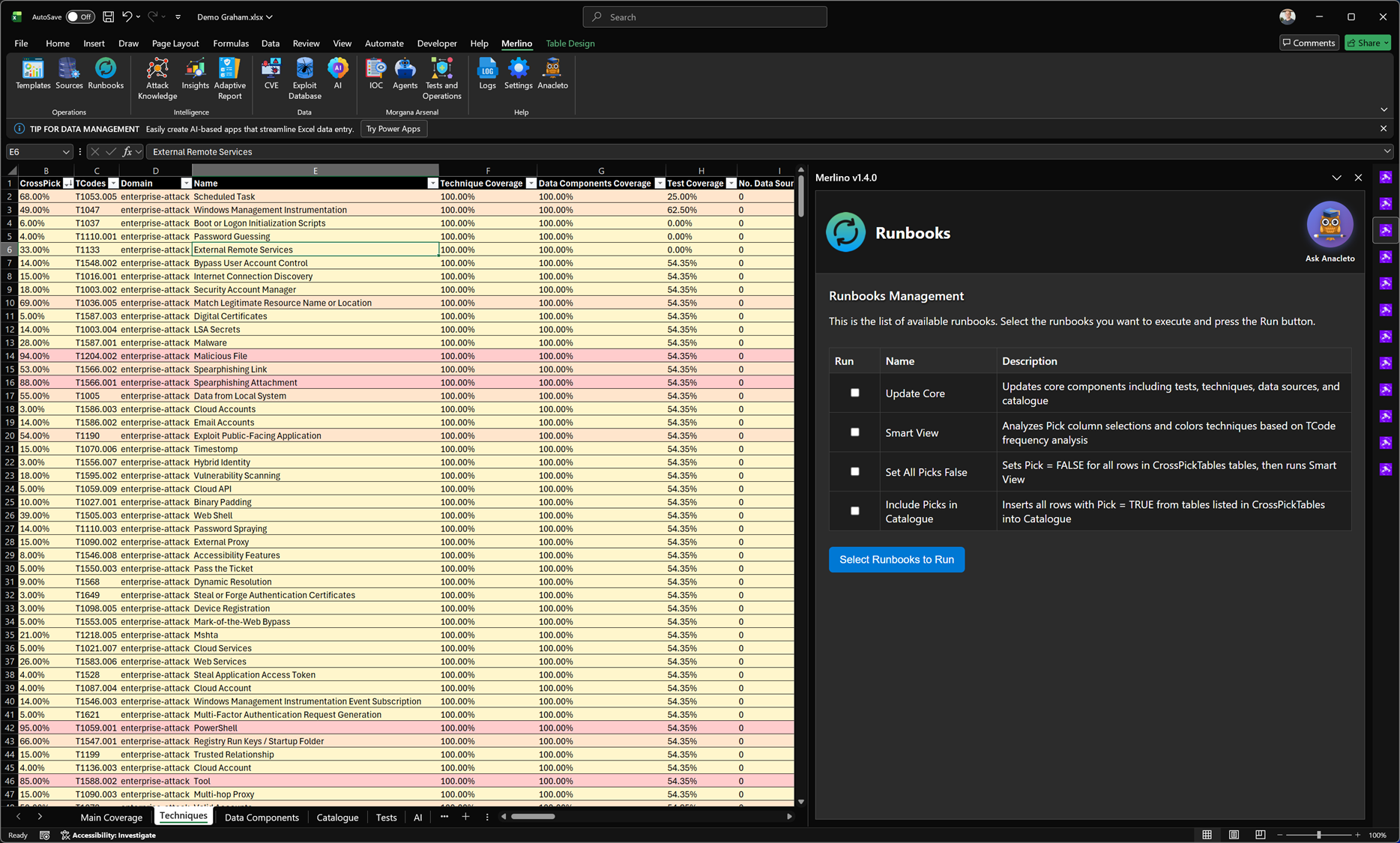
Runbooks are Merlino’s built-in automation processes that execute repeatable operations across the workbook. Use them to refresh the global security posture, enable advanced CTI-driven statistics by intersecting multiple cyber datasets, and inject CTI context into red team tests and operational workflows. Runbooks are continuously improved over time, with new capabilities and enhancements added periodically.
Runbooks are Merlino’s built-in automation processes that execute repeatable operations across the workbook. Use them to refresh the global security posture, enable advanced CTI-driven statistics by intersecting multiple cyber datasets, and inject CTI context into red team tests and operational workflows. Runbooks are continuously improved over time, with new capabilities and enhancements added periodically.
Attack Knowledge
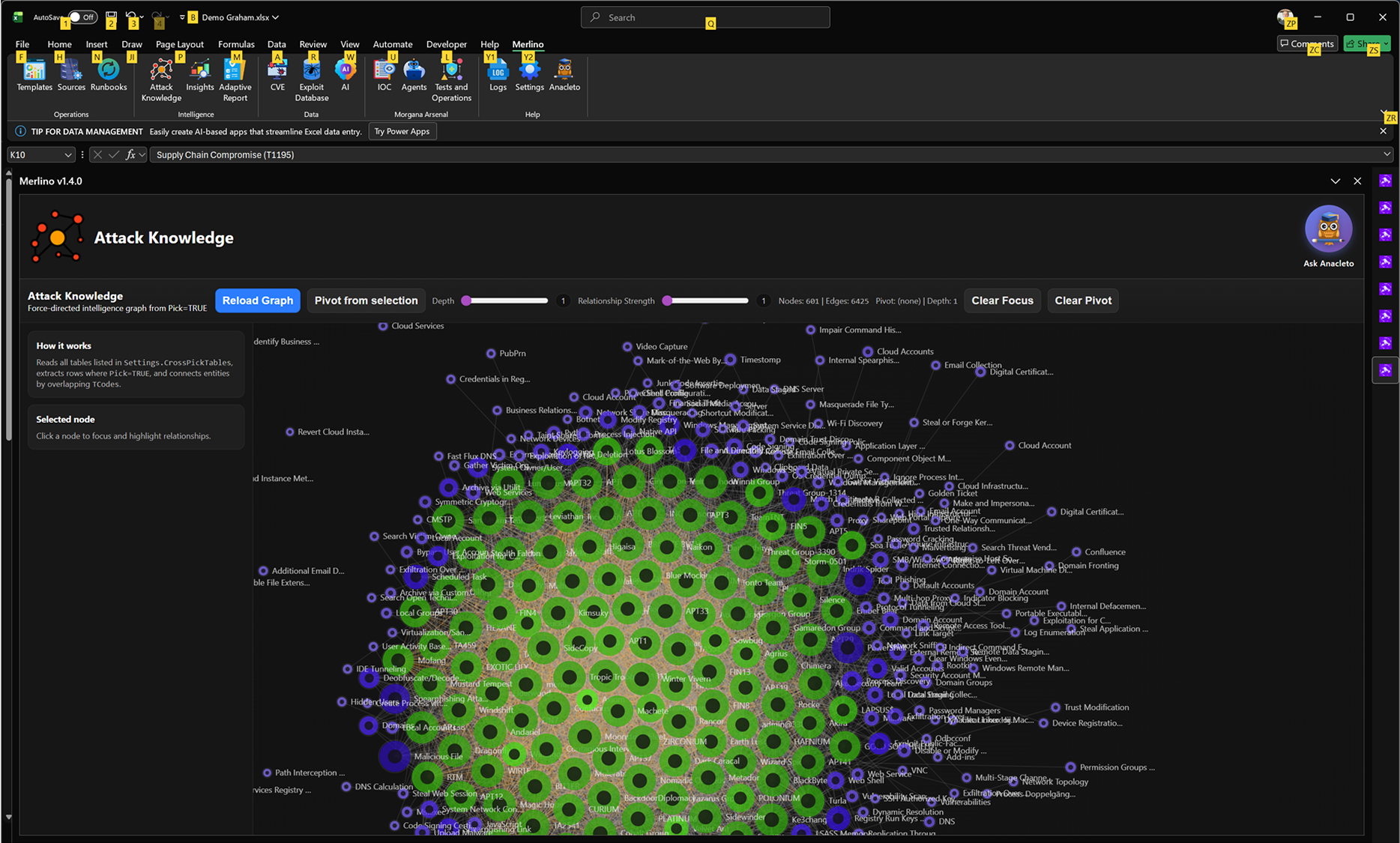
Attack Knowledge is Merlino’s force-directed relationship graph that connects security entities into a single, navigable model. It links CTI, MITRE ATT&CK techniques, threat actors, tools, malware, CVEs, indicators, assets, detections, and data sources so you can pivot quickly while preserving context. Use it to explore how an entity relates to others, identify clusters and dependencies, and understand which techniques and threat patterns matter most in your environment. By keeping intelligence, threat modeling, and detection coverage connected in one view, Attack Knowledge reduces fragmentation and supports clearer, evidence-driven validation and reporting.
Attack Knowledge is Merlino’s force-directed relationship graph that connects security entities into a single, navigable model. It links CTI, MITRE ATT&CK techniques, threat actors, tools, malware, CVEs, indicators, assets, detections, and data sources so you can pivot quickly while preserving context. Use it to explore how an entity relates to others, identify clusters and dependencies, and understand which techniques and threat patterns matter most in your environment. By keeping intelligence, threat modeling, and detection coverage connected in one view, Attack Knowledge reduces fragmentation and supports clearer, evidence-driven validation and reporting.
Insights
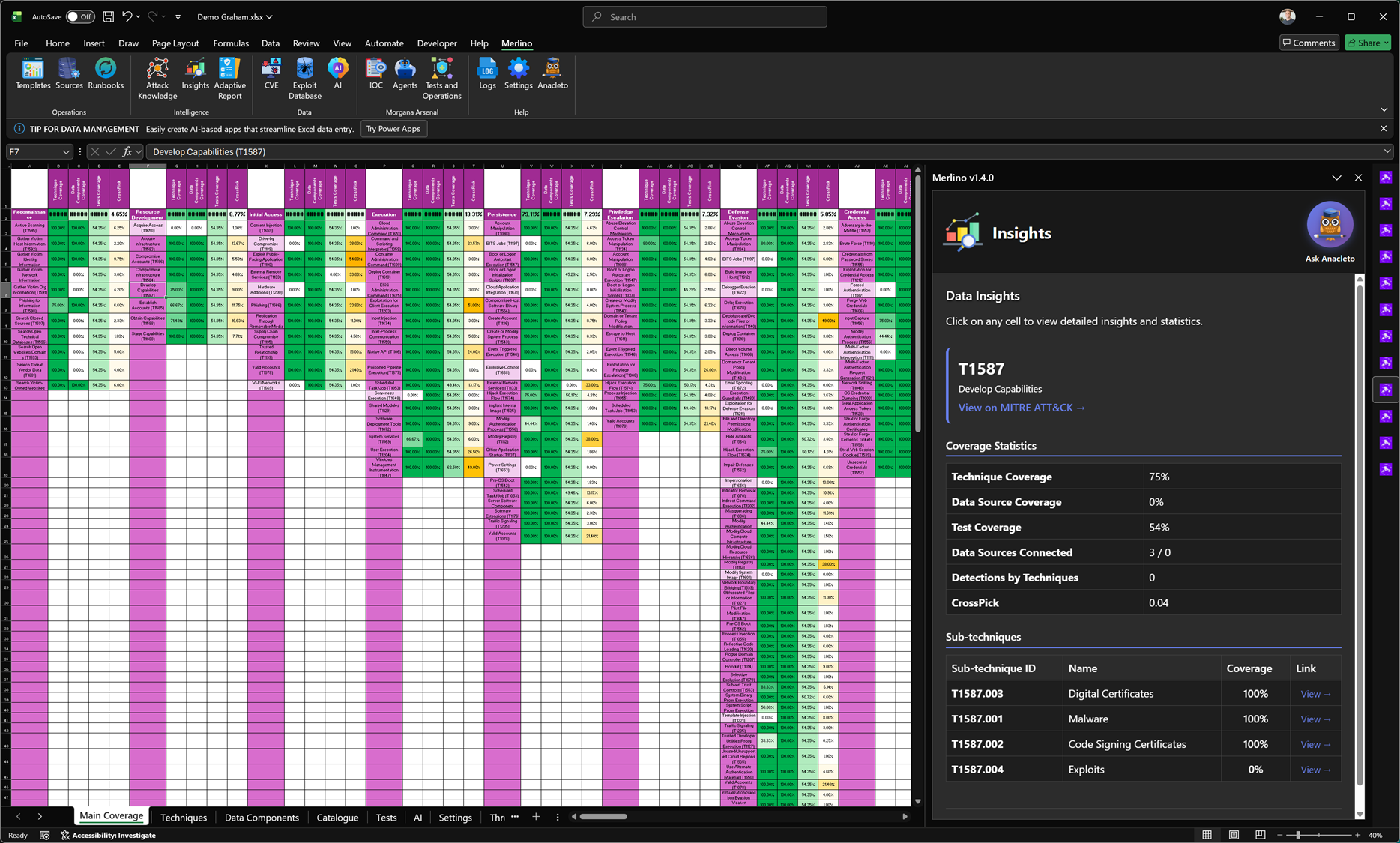
Insights provides instant, context-aware details for the TTPs referenced in the selected row or cell. When you click on a technique (or select data that contains multiple techniques), Merlino surfaces structured intelligence for each TTP, including Procedures, Detections, and Mitigations, alongside deep statistics calculated from your Merlino data. This includes technique and sub-technique coverage, test coverage, consistency indicators, and other quality signals that help you understand how well a TTP is represented, validated, and operationally supported in your workbook.
Insights provides instant, context-aware details for the TTPs referenced in the selected row or cell. When you click on a technique (or select data that contains multiple techniques), Merlino surfaces structured intelligence for each TTP, including Procedures, Detections, and Mitigations, alongside deep statistics calculated from your Merlino data. This includes technique and sub-technique coverage, test coverage, consistency indicators, and other quality signals that help you understand how well a TTP is represented, validated, and operationally supported in your workbook.
Adaptive Report (Main Coverage)
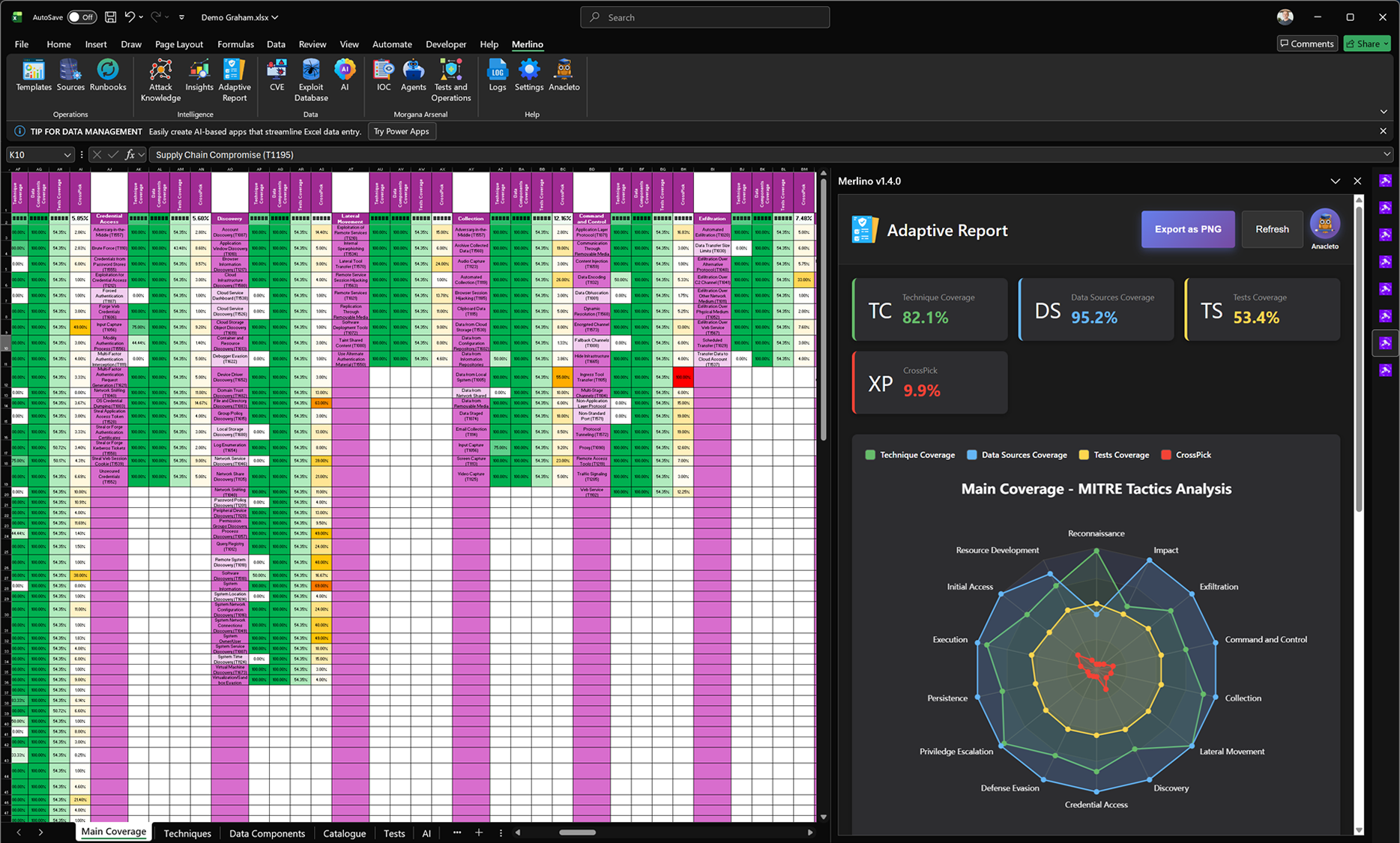
When you select the Main Coverage sheet, Adaptive Report generates a global posture dashboard for your current model. It consolidates the four core signals—Technique Coverage (TC), Data Sources Coverage (DS), Tests Coverage (TS), and CrossPick (XP)—to provide an immediate, measurable snapshot of coverage and correlation across the workbook. The report includes a MITRE tactics radar analysis that visualizes how these coverage dimensions distribute across the ATT&CK chain, helping you quickly spot imbalances and prioritize the tactics that need attention. The dashboard can be refreshed on demand as mappings change and exported as a clean PNG for reporting.
When you select the Main Coverage sheet, Adaptive Report generates a global posture dashboard for your current model. It consolidates the four core signals—Technique Coverage (TC), Data Sources Coverage (DS), Tests Coverage (TS), and CrossPick (XP)—to provide an immediate, measurable snapshot of coverage and correlation across the workbook. The report includes a MITRE tactics radar analysis that visualizes how these coverage dimensions distribute across the ATT&CK chain, helping you quickly spot imbalances and prioritize the tactics that need attention. The dashboard can be refreshed on demand as mappings change and exported as a clean PNG for reporting.
Adaptive Report (Techniques)
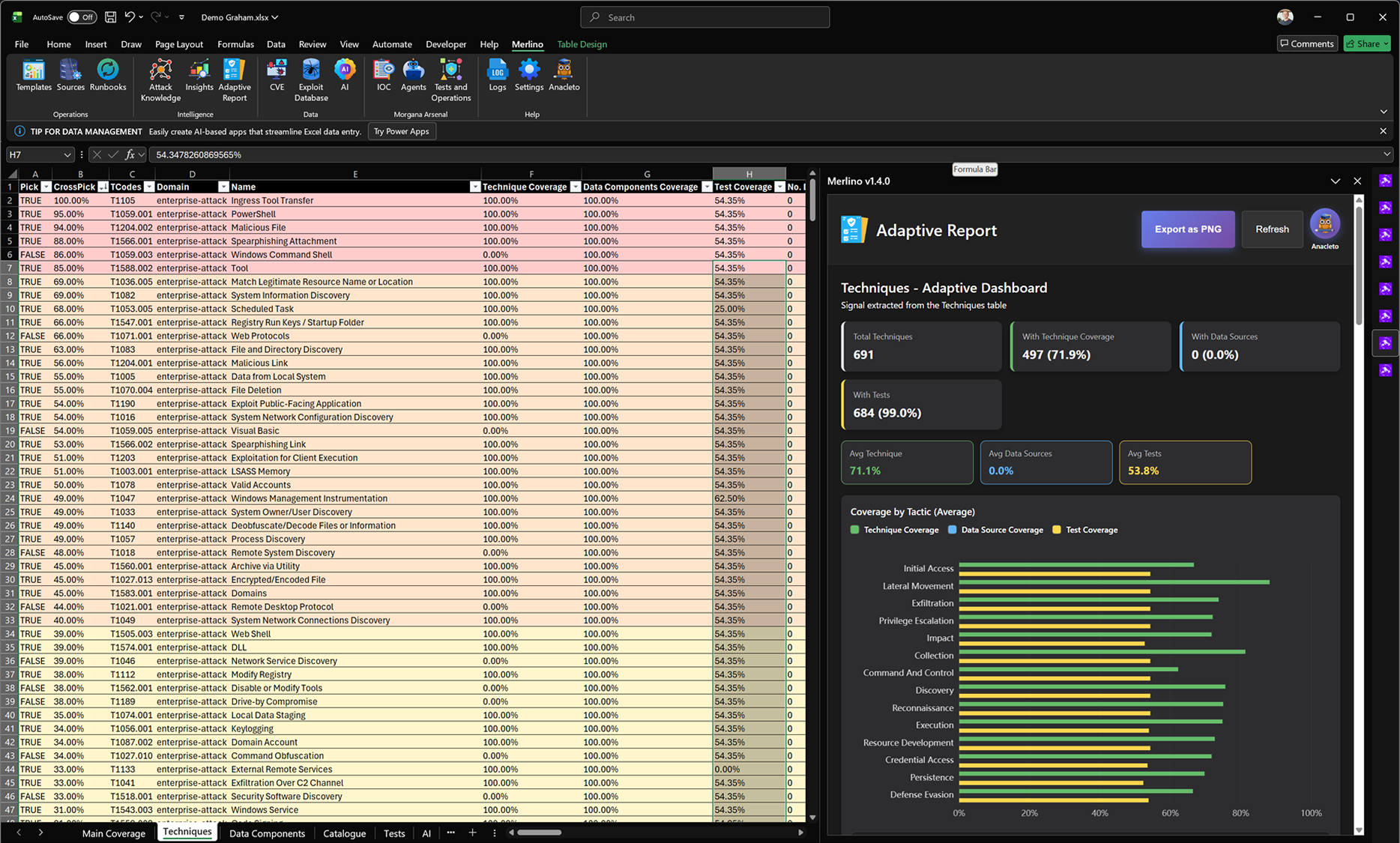
When you select the Techniques sheet, Adaptive Report automatically generates a Techniques-specific dashboard. It reads the Techniques table and builds an instant snapshot of the dataset, including total techniques in scope, how many have technique coverage, how many are linked to tests, and the current average coverage values. The report also breaks coverage down by MITRE tactic, so you can quickly see where coverage is strong and where it is weaker across the ATT&CK chain. This dashboard updates on refresh as your mappings change and can be exported as a clean PNG for reporting.
When you select the Techniques sheet, Adaptive Report automatically generates a Techniques-specific dashboard. It reads the Techniques table and builds an instant snapshot of the dataset, including total techniques in scope, how many have technique coverage, how many are linked to tests, and the current average coverage values. The report also breaks coverage down by MITRE tactic, so you can quickly see where coverage is strong and where it is weaker across the ATT&CK chain. This dashboard updates on refresh as your mappings change and can be exported as a clean PNG for reporting.
CVE Manager
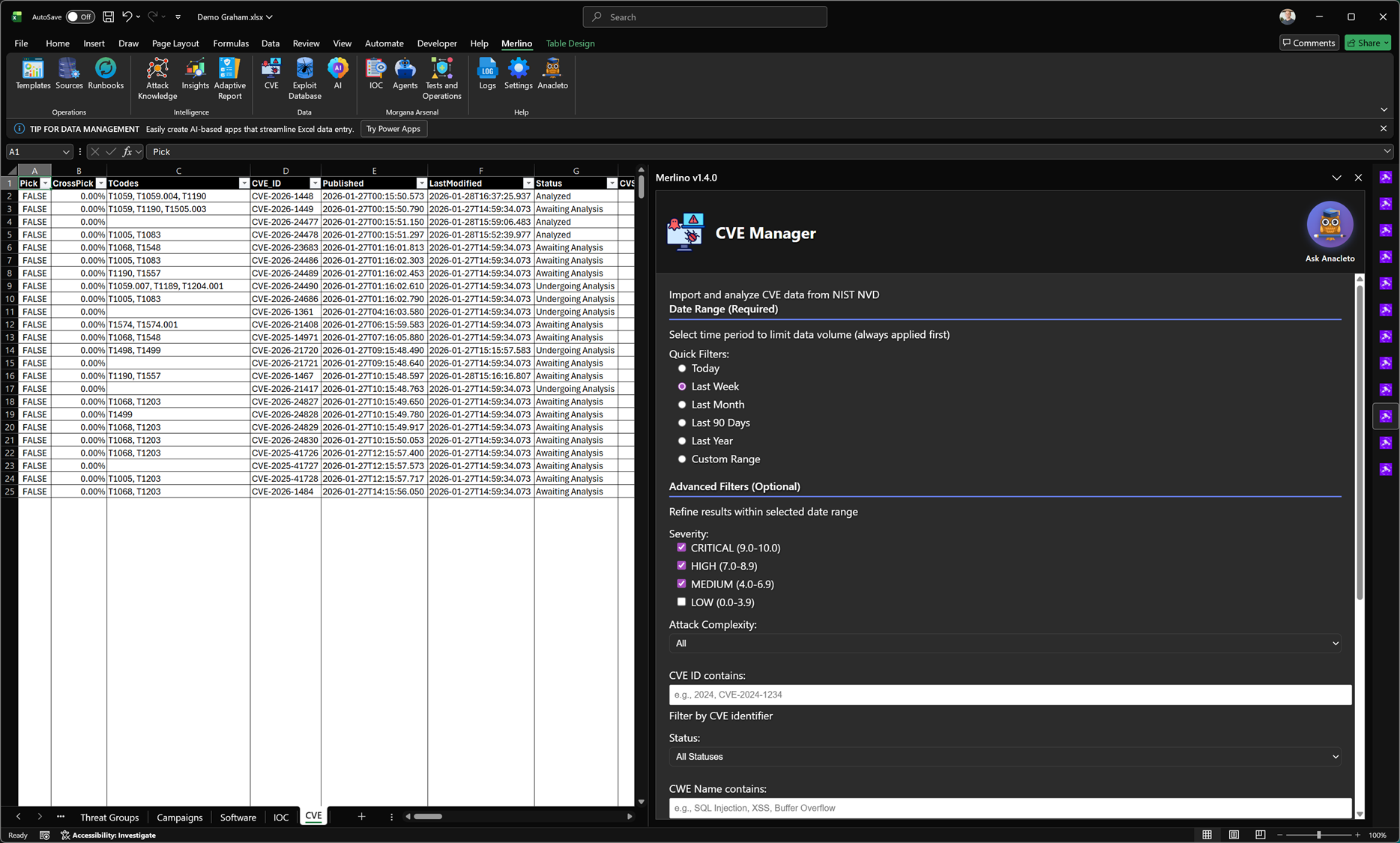
CVE Manager imports CVE data directly from official sources and turns vulnerability information into an operational workflow inside Merlino. You can filter and analyze CVEs by time range, severity, and other attributes, then enrich them with CTI by linking to MITRE context and related entities across the workbook. This enables advanced cross-analysis between vulnerabilities, techniques, threat activity, and your defensive coverage. CVE Manager also supports validation activities by connecting CVEs to tests and red teaming workflows, helping you verify whether patching, hardening, and security controls are actually effective in your environment.
CVE Manager imports CVE data directly from official sources and turns vulnerability information into an operational workflow inside Merlino. You can filter and analyze CVEs by time range, severity, and other attributes, then enrich them with CTI by linking to MITRE context and related entities across the workbook. This enables advanced cross-analysis between vulnerabilities, techniques, threat activity, and your defensive coverage. CVE Manager also supports validation activities by connecting CVEs to tests and red teaming workflows, helping you verify whether patching, hardening, and security controls are actually effective in your environment.
Tests & Operations
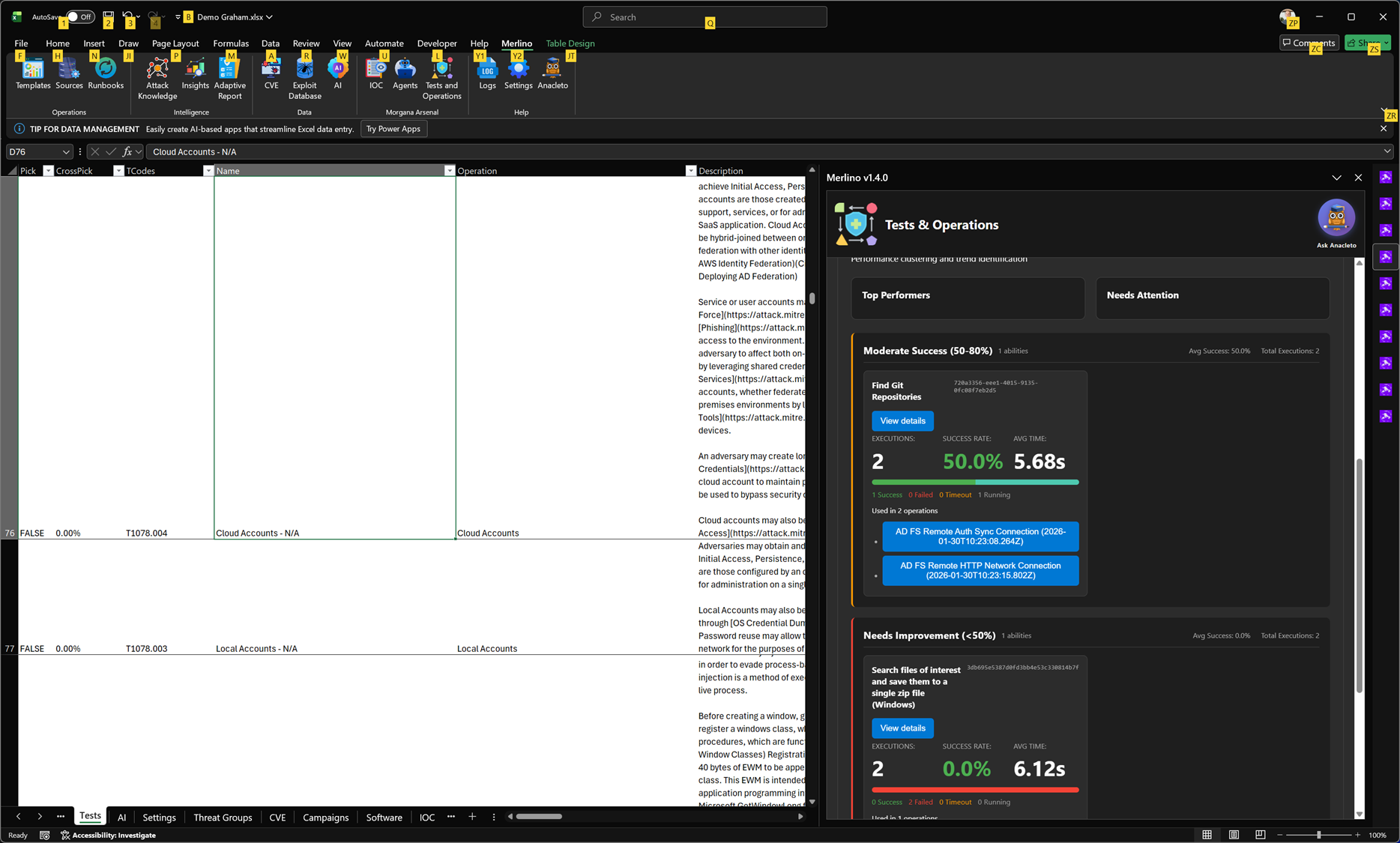
Tests & Operations is Merlino’s control center for validation and red teaming execution. It organizes tests from the Merlino Catalogue, synchronizes with Morgana (Caldera), and automatically builds Operations to run adversary emulation against target machines. From a single place you can orchestrate execution, track outcomes, and review performance across tests and campaigns. Results are continuously synchronized back into Merlino, so test outcomes immediately influence coverage, success rates, and overall posture statistics.
Tests & Operations is Merlino’s control center for validation and red teaming execution. It organizes tests from the Merlino Catalogue, synchronizes with Morgana (Caldera), and automatically builds Operations to run adversary emulation against target machines. From a single place you can orchestrate execution, track outcomes, and review performance across tests and campaigns. Results are continuously synchronized back into Merlino, so test outcomes immediately influence coverage, success rates, and overall posture statistics.
Tests & Operations (Performance Report)
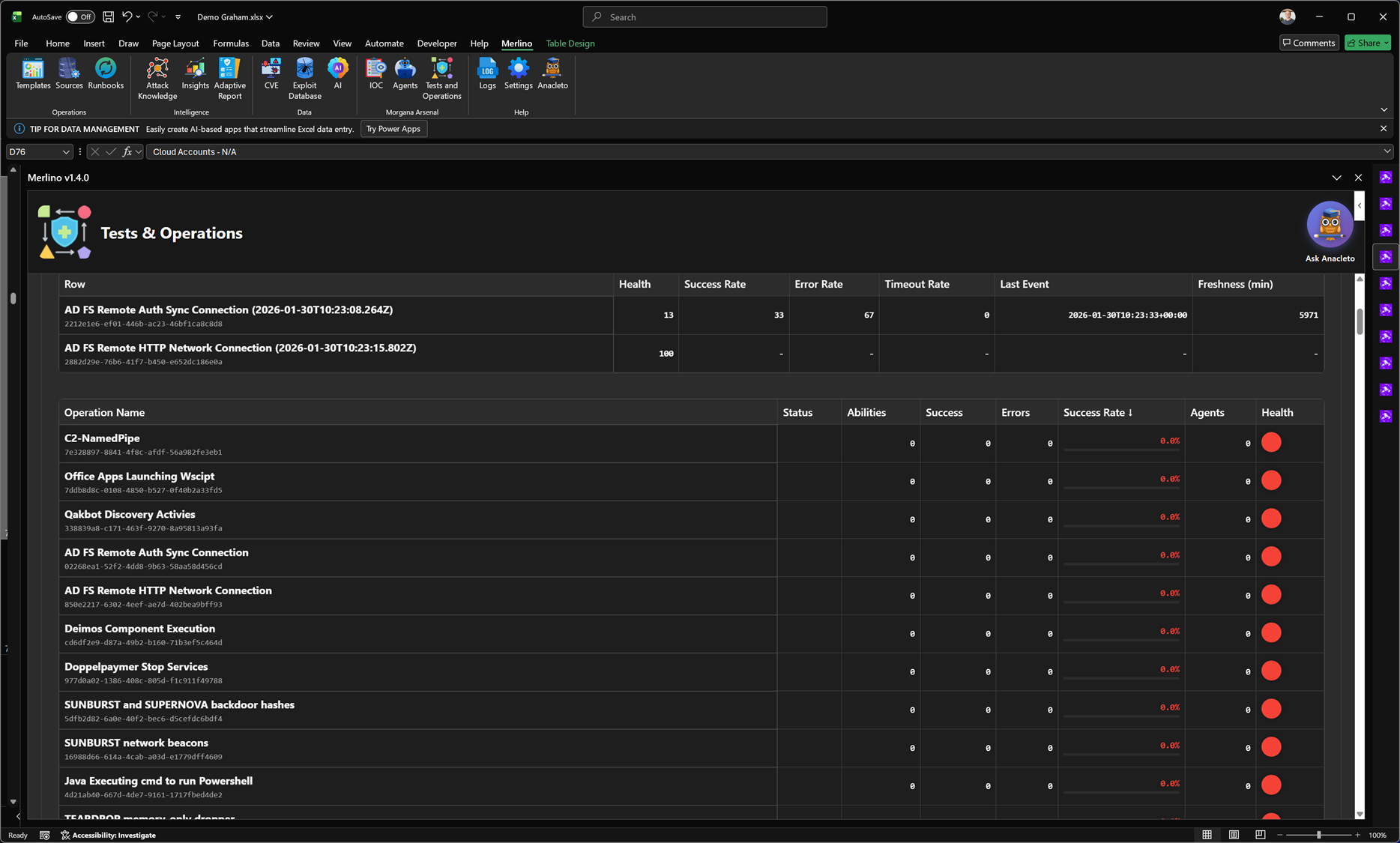
The Performance Report provides an operational view of how well your adversary emulation runs are performing over time. It summarizes execution health and reliability per operation, showing success rate, error rate, timeout rate, last execution event, and data freshness. This makes it easy to identify which operations are stable, which are failing or timing out, and where tuning is required before results can be trusted for coverage validation. Performance metrics are synchronized from Morgana (Caldera) and reflected back into Merlino so execution quality directly supports evidence-based posture and reporting.
The Performance Report provides an operational view of how well your adversary emulation runs are performing over time. It summarizes execution health and reliability per operation, showing success rate, error rate, timeout rate, last execution event, and data freshness. This makes it easy to identify which operations are stable, which are failing or timing out, and where tuning is required before results can be trusted for coverage validation. Performance metrics are synchronized from Morgana (Caldera) and reflected back into Merlino so execution quality directly supports evidence-based posture and reporting.
Tests & Operations (Error Analytics)
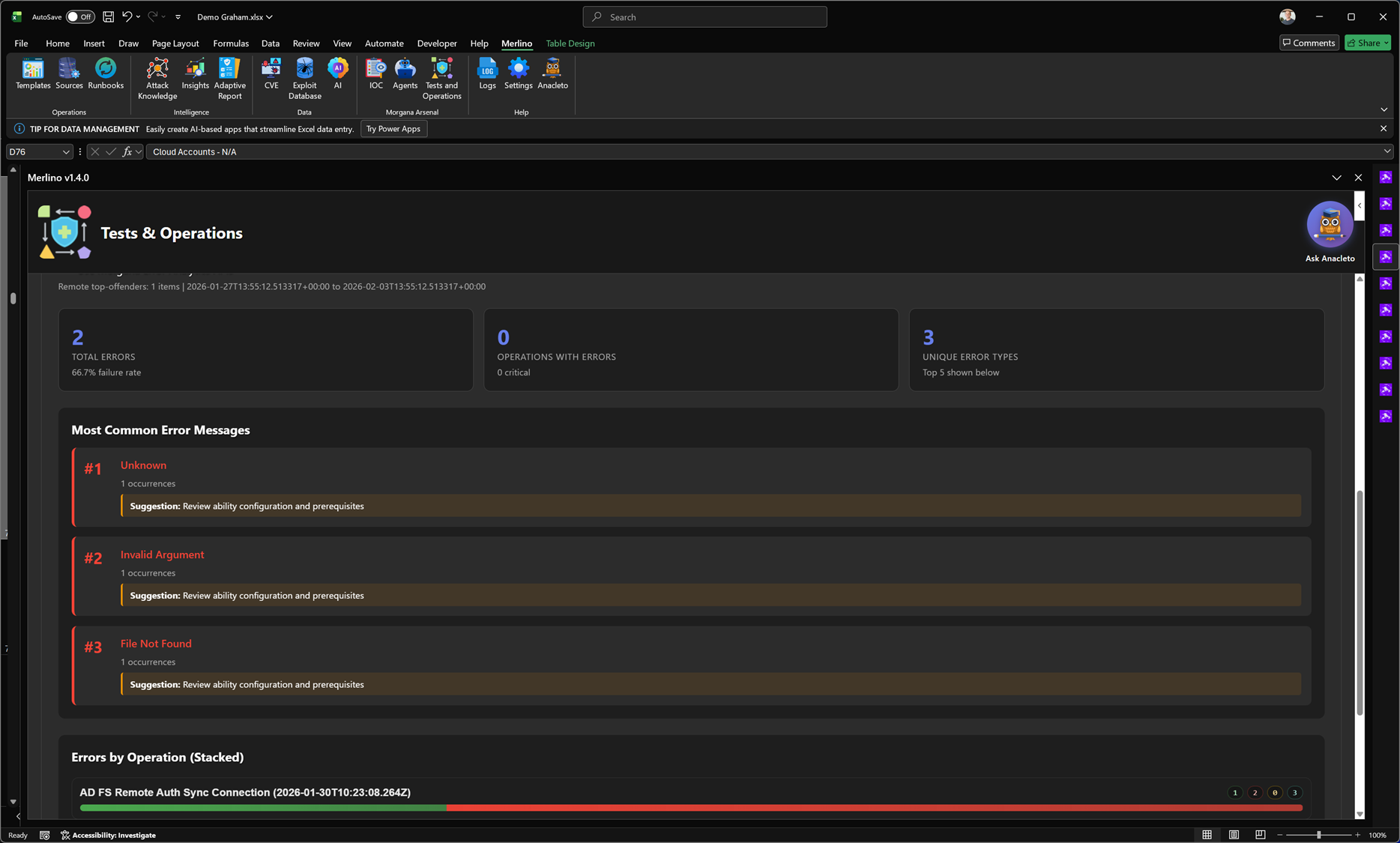
Error Analytics is the troubleshooting dashboard for adversary emulation execution. It aggregates errors across operations and highlights the most common error messages, how often they occur, and which operations are affected. The report includes summary statistics (total errors, operations with errors, unique error types) and visual breakdowns to help you quickly identify systemic configuration issues versus operation-specific failures. This makes it faster to stabilize executions, improve reliability, and ensure that test outcomes can be trusted for coverage validation.
Error Analytics is the troubleshooting dashboard for adversary emulation execution. It aggregates errors across operations and highlights the most common error messages, how often they occur, and which operations are affected. The report includes summary statistics (total errors, operations with errors, unique error types) and visual breakdowns to help you quickly identify systemic configuration issues versus operation-specific failures. This makes it faster to stabilize executions, improve reliability, and ensure that test outcomes can be trusted for coverage validation.
Tests & Operations (Real-Time Operations Metrics)
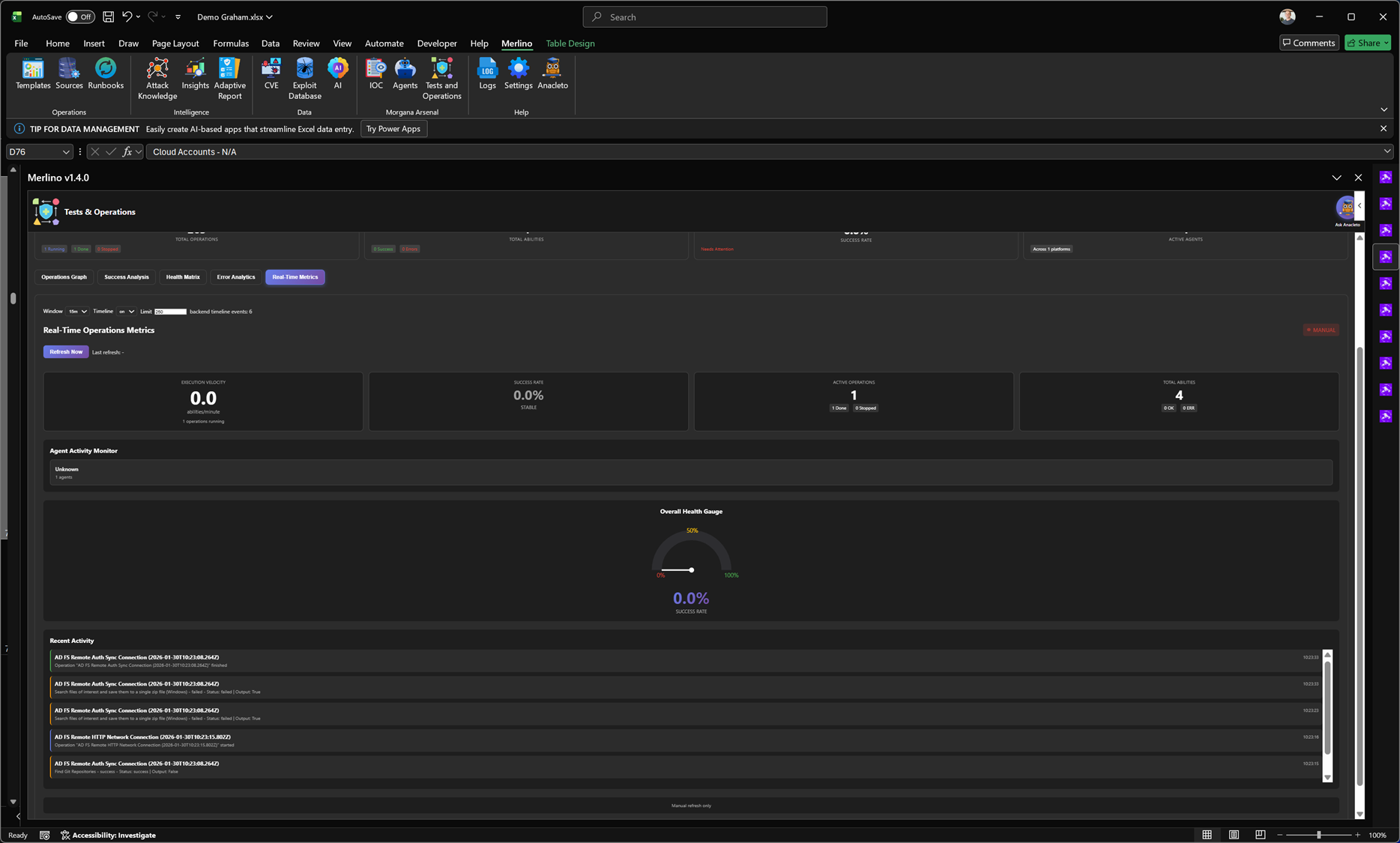
Real-Time Operations Metrics is the live monitoring dashboard for active red teaming and adversary emulation runs. It provides an at-a-glance view of execution velocity, current success rate, active operations, and active abilities, combined with an agent activity monitor and an overall health gauge. The report also streams recent activity events so you can track what is happening right now, detect stalled agents or failing abilities immediately, and confirm that operations are producing reliable execution data before results are used for validation and posture metrics.
Real-Time Operations Metrics is the live monitoring dashboard for active red teaming and adversary emulation runs. It provides an at-a-glance view of execution velocity, current success rate, active operations, and active abilities, combined with an agent activity monitor and an overall health gauge. The report also streams recent activity events so you can track what is happening right now, detect stalled agents or failing abilities immediately, and confirm that operations are producing reliable execution data before results are used for validation and posture metrics.
Tests & Operations (Ops Graph)
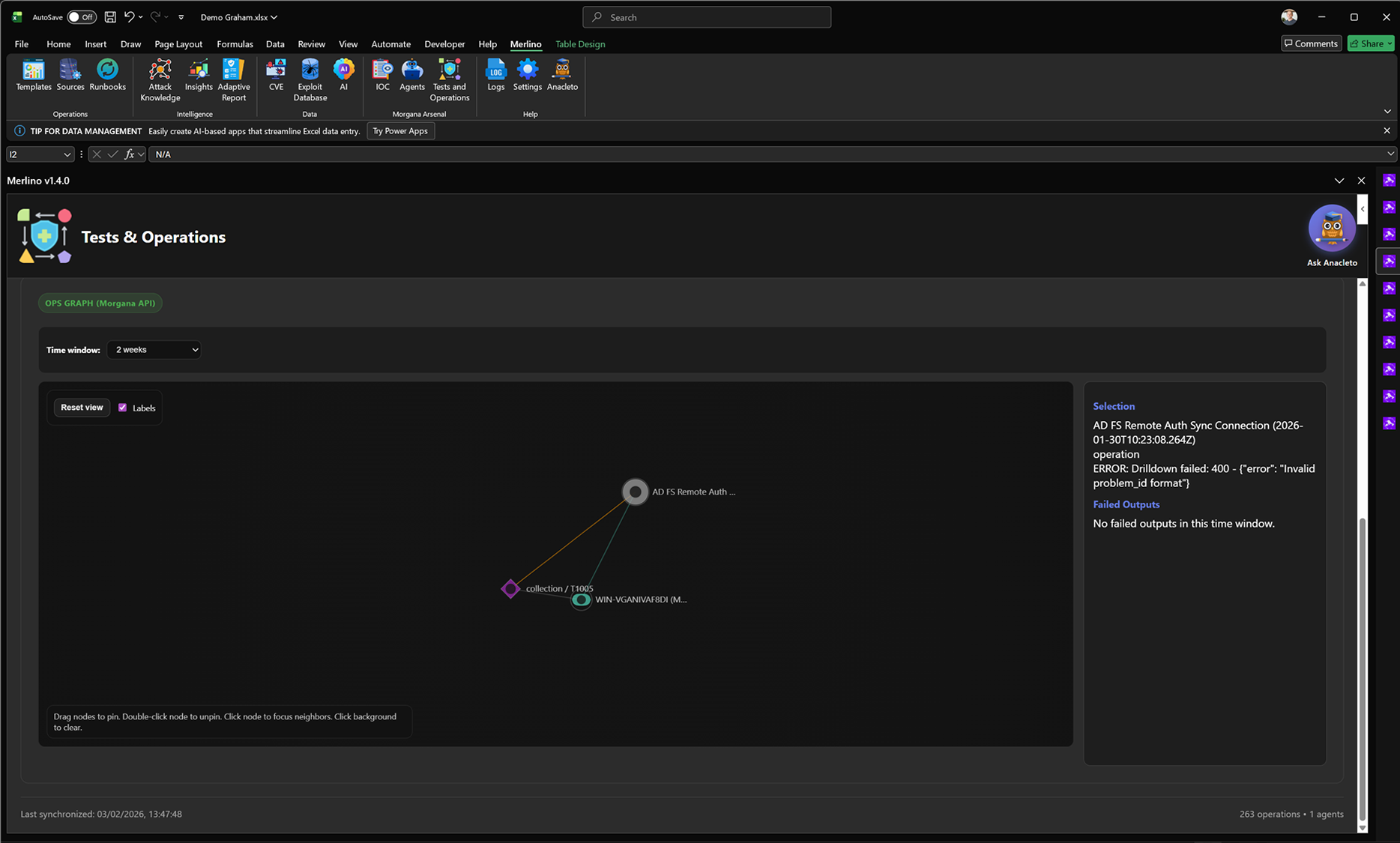
Ops Graph is the force-directed operations graph that visualizes relationships across your red teaming execution data. It maps Operations, Abilities, Agents, targets, and linked TTPs into a single interactive view so you can understand what ran, where it ran, and how entities connect over time. Use it to pivot from an operation to its abilities and targets, isolate a specific time window, and quickly identify execution patterns, dependencies, and troubleshooting hotspots. The graph is synchronized from Morgana (Caldera) and provides a clear relationship view that complements the tabular performance and error reports.
Ops Graph is the force-directed operations graph that visualizes relationships across your red teaming execution data. It maps Operations, Abilities, Agents, targets, and linked TTPs into a single interactive view so you can understand what ran, where it ran, and how entities connect over time. Use it to pivot from an operation to its abilities and targets, isolate a specific time window, and quickly identify execution patterns, dependencies, and troubleshooting hotspots. The graph is synchronized from Morgana (Caldera) and provides a clear relationship view that complements the tabular performance and error reports.
Agents Intelligence
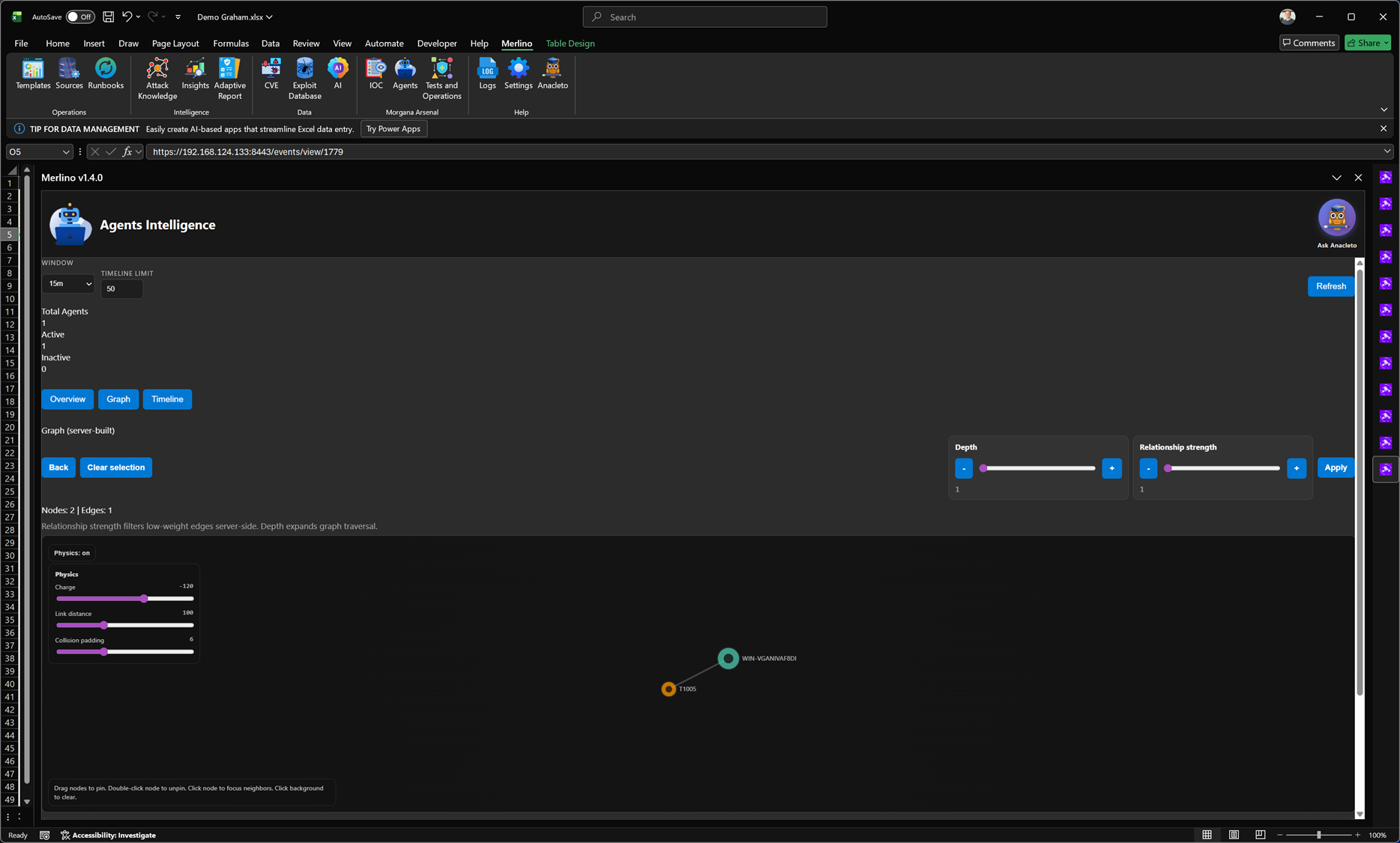
Agents Intelligence provides visibility into the testing agents used for adversary emulation and validation. It shows which agents are active or inactive, tracks recent activity within a selectable time window, and visualizes relationships between agents, operations, and executed abilities through an interactive graph. This helps you confirm that targets are correctly onboarded, detect stalled or disconnected agents quickly, and maintain confidence that operational results are being generated from healthy, responsive execution infrastructure.
Agents Intelligence provides visibility into the testing agents used for adversary emulation and validation. It shows which agents are active or inactive, tracks recent activity within a selectable time window, and visualizes relationships between agents, operations, and executed abilities through an interactive graph. This helps you confirm that targets are correctly onboarded, detect stalled or disconnected agents quickly, and maintain confidence that operational results are being generated from healthy, responsive execution infrastructure.
IOC
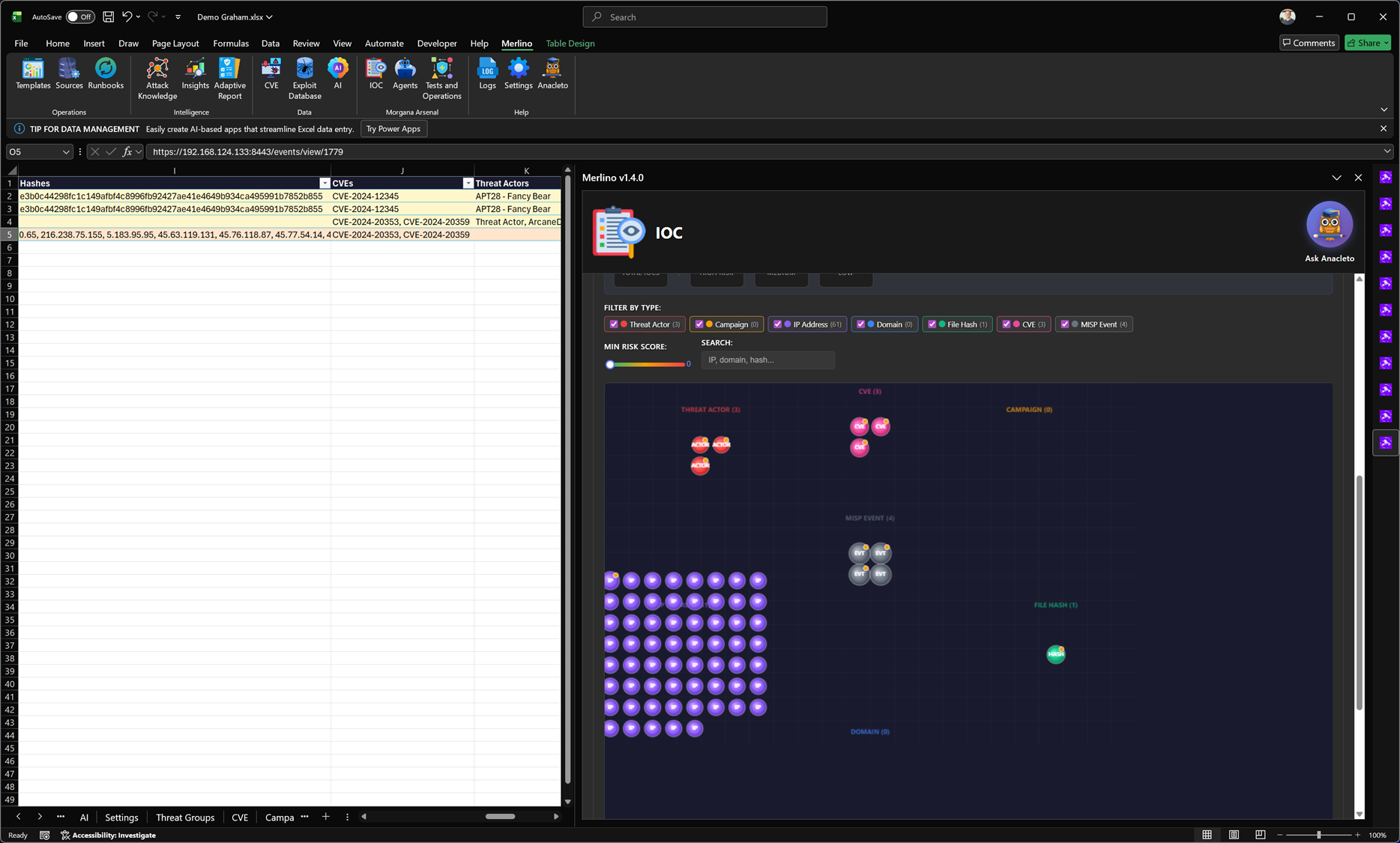
IOC is Merlino’s workspace for managing Indicators of Compromise and CTI entities across your datasets. It lets you organize and explore indicators such as IP addresses, domains, file hashes, CVEs, threat actors, campaigns, and MISP events in a single, searchable view with filtering and basic risk scoring. Merlino is fully integrated with MISP (Malware Information Sharing Platform), the widely used open-source CTI platform for sharing, enriching, and correlating threat intelligence. From IOC you can export selected indicators and entities to MISP as structured events, then re-import them back into Merlino after enrichment (for example with tags, relationships, additional indicators, and context) to keep your workbook intelligence continuously updated.
IOC is Merlino’s workspace for managing Indicators of Compromise and CTI entities across your datasets. It lets you organize and explore indicators such as IP addresses, domains, file hashes, CVEs, threat actors, campaigns, and MISP events in a single, searchable view with filtering and basic risk scoring. Merlino is fully integrated with MISP (Malware Information Sharing Platform), the widely used open-source CTI platform for sharing, enriching, and correlating threat intelligence. From IOC you can export selected indicators and entities to MISP as structured events, then re-import them back into Merlino after enrichment (for example with tags, relationships, additional indicators, and context) to keep your workbook intelligence continuously updated.
Morgana Arsenal (Caldera for Merlino)
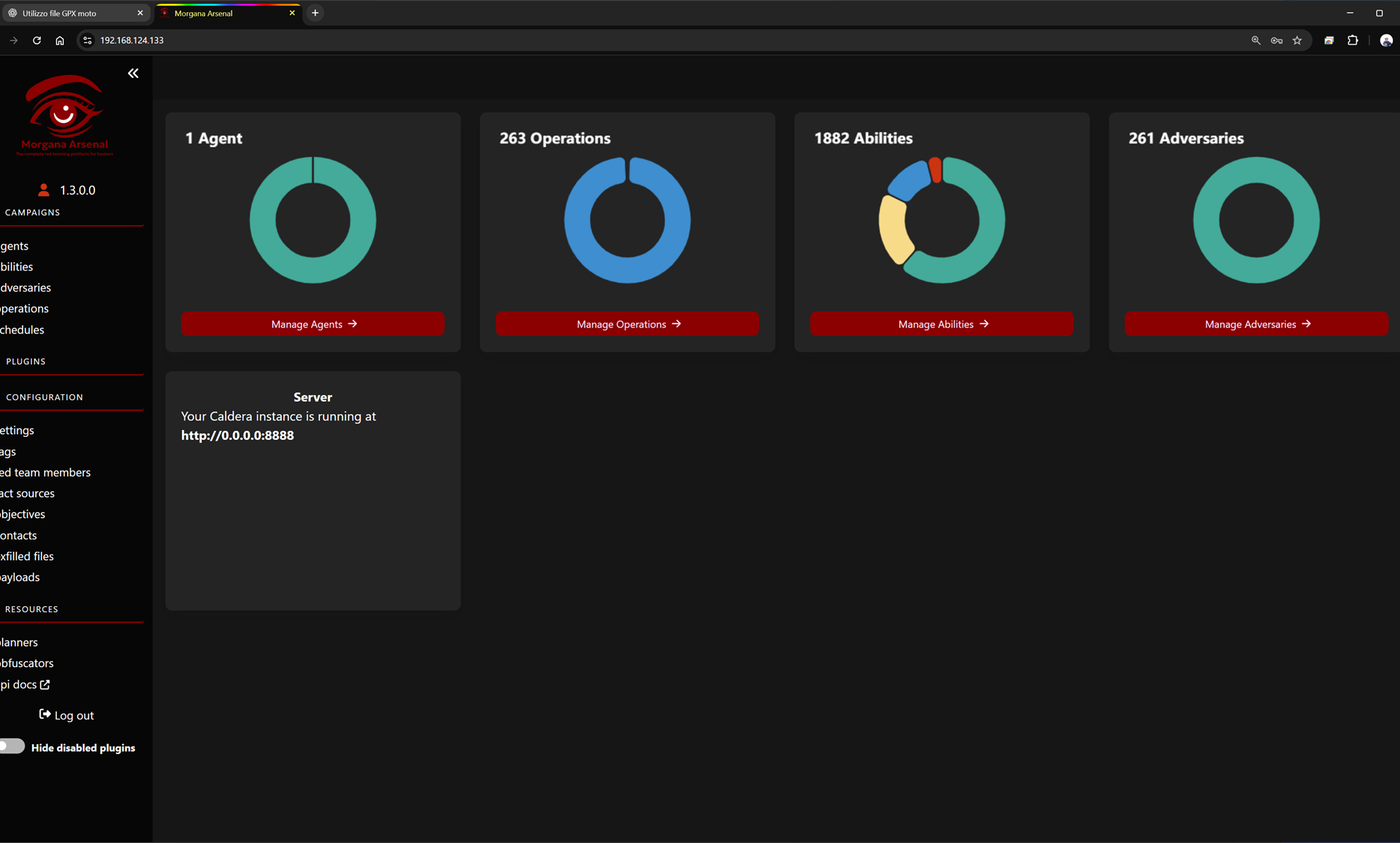
Merlino integrates with Morgana Arsenal, a Merlino-tailored fork of MITRE Caldera—the open-source adversary emulation platform used to run controlled red team activities and simulate real attacker behavior. Morgana Arsenal provides the execution layer for Merlino: you can manage agents on target systems, organize abilities (atomic actions mapped to TTPs), build adversary profiles, and run operations that emulate attack paths end-to-end. The platform also supports scheduling, fact sources, objectives, and operational configuration, allowing teams to run repeatable, measurable adversary emulation campaigns. Results produced in Morgana Arsenal are synchronized back into Merlino so execution evidence directly feeds coverage, validation, and reporting workflows.
Merlino integrates with Morgana Arsenal, a Merlino-tailored fork of MITRE Caldera—the open-source adversary emulation platform used to run controlled red team activities and simulate real attacker behavior. Morgana Arsenal provides the execution layer for Merlino: you can manage agents on target systems, organize abilities (atomic actions mapped to TTPs), build adversary profiles, and run operations that emulate attack paths end-to-end. The platform also supports scheduling, fact sources, objectives, and operational configuration, allowing teams to run repeatable, measurable adversary emulation campaigns. Results produced in Morgana Arsenal are synchronized back into Merlino so execution evidence directly feeds coverage, validation, and reporting workflows.
Adversaries (Auto-Generated Profiles)
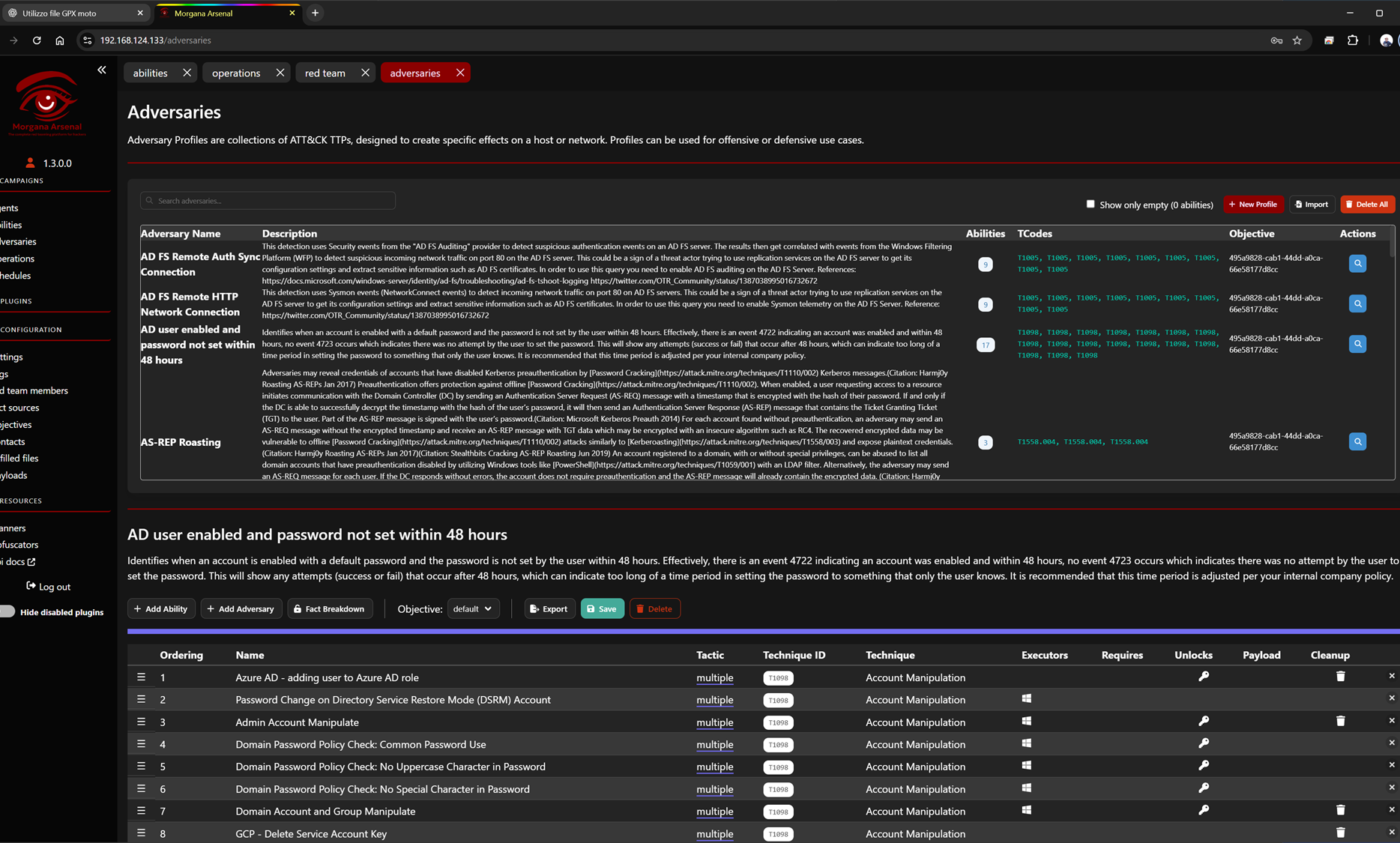
In Morgana Arsenal, the Adversaries section contains adversary profiles that are created automatically by Merlino. Based on the data you model and analyze in Merlino (TTP selections, technique chains, priorities, and context), Merlino generates complete ATT&CK-aligned attack chains and publishes them to Morgana Arsenal as ready-to-run adversary profiles. Each profile includes the mapped techniques, ordered abilities, objectives, and execution-ready structure—so you can move from intelligence and planning to real adversary emulation in minutes, with minimal manual work.
In Morgana Arsenal, the Adversaries section contains adversary profiles that are created automatically by Merlino. Based on the data you model and analyze in Merlino (TTP selections, technique chains, priorities, and context), Merlino generates complete ATT&CK-aligned attack chains and publishes them to Morgana Arsenal as ready-to-run adversary profiles. Each profile includes the mapped techniques, ordered abilities, objectives, and execution-ready structure—so you can move from intelligence and planning to real adversary emulation in minutes, with minimal manual work.
Operations (Auto-Generated Runs)
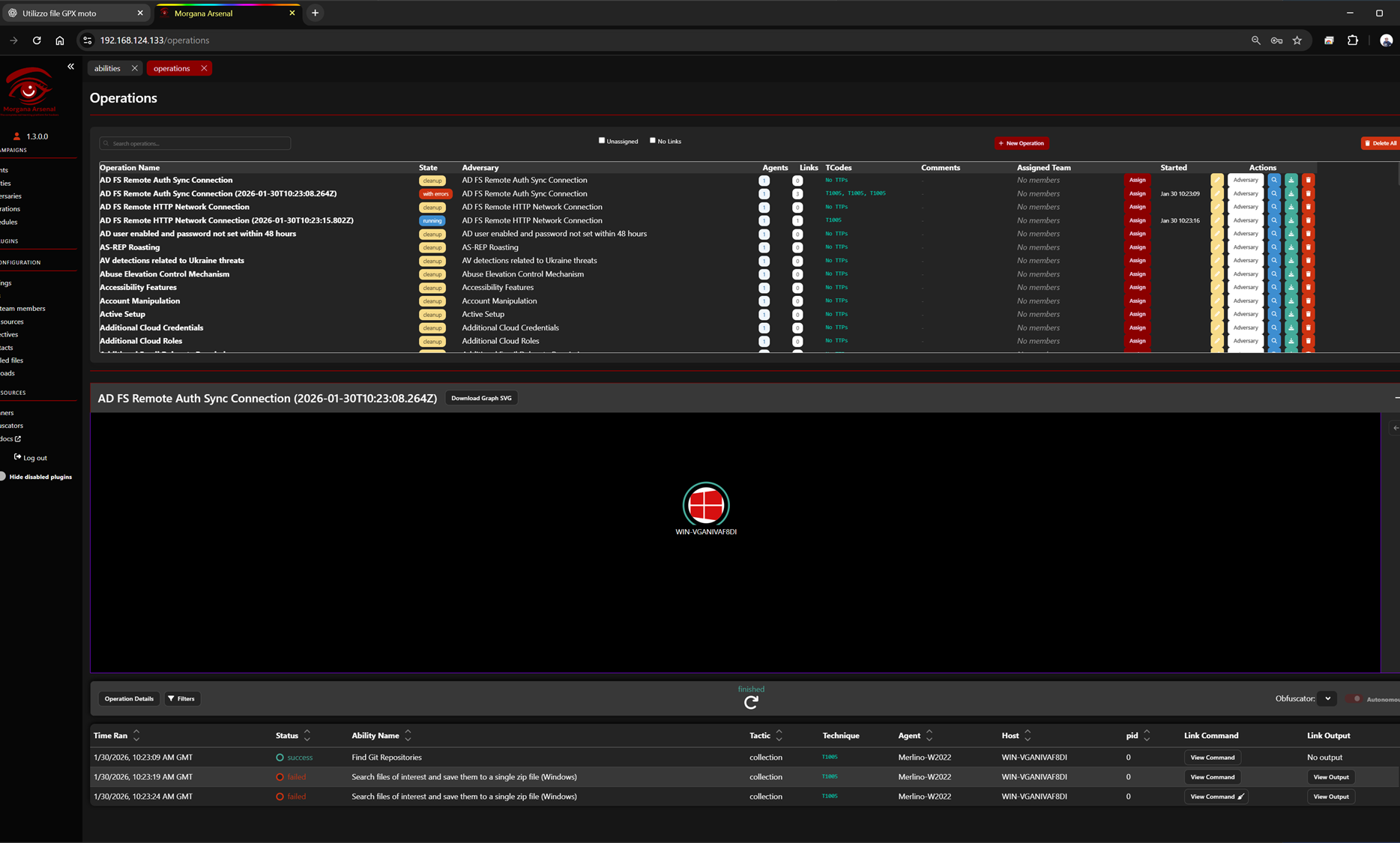
In Morgana Arsenal, Operations are the executable runs where adversary emulation actually happens. Merlino automatically creates and organizes Operations based on the attack chains and adversary profiles generated from your Merlino data. Each Operation is pre-built with the right adversary, mapped TTPs, target agents, and execution structure—so you can move from analysis to a runnable multi-stage simulation in minutes. This enables rapid emulation of complete attack paths, including full campaigns and APT-style multi-stage scenarios, while keeping execution results synchronized back into Merlino for measurable validation and reporting.
In Morgana Arsenal, Operations are the executable runs where adversary emulation actually happens. Merlino automatically creates and organizes Operations based on the attack chains and adversary profiles generated from your Merlino data. Each Operation is pre-built with the right adversary, mapped TTPs, target agents, and execution structure—so you can move from analysis to a runnable multi-stage simulation in minutes. This enables rapid emulation of complete attack paths, including full campaigns and APT-style multi-stage scenarios, while keeping execution results synchronized back into Merlino for measurable validation and reporting.