
Templates
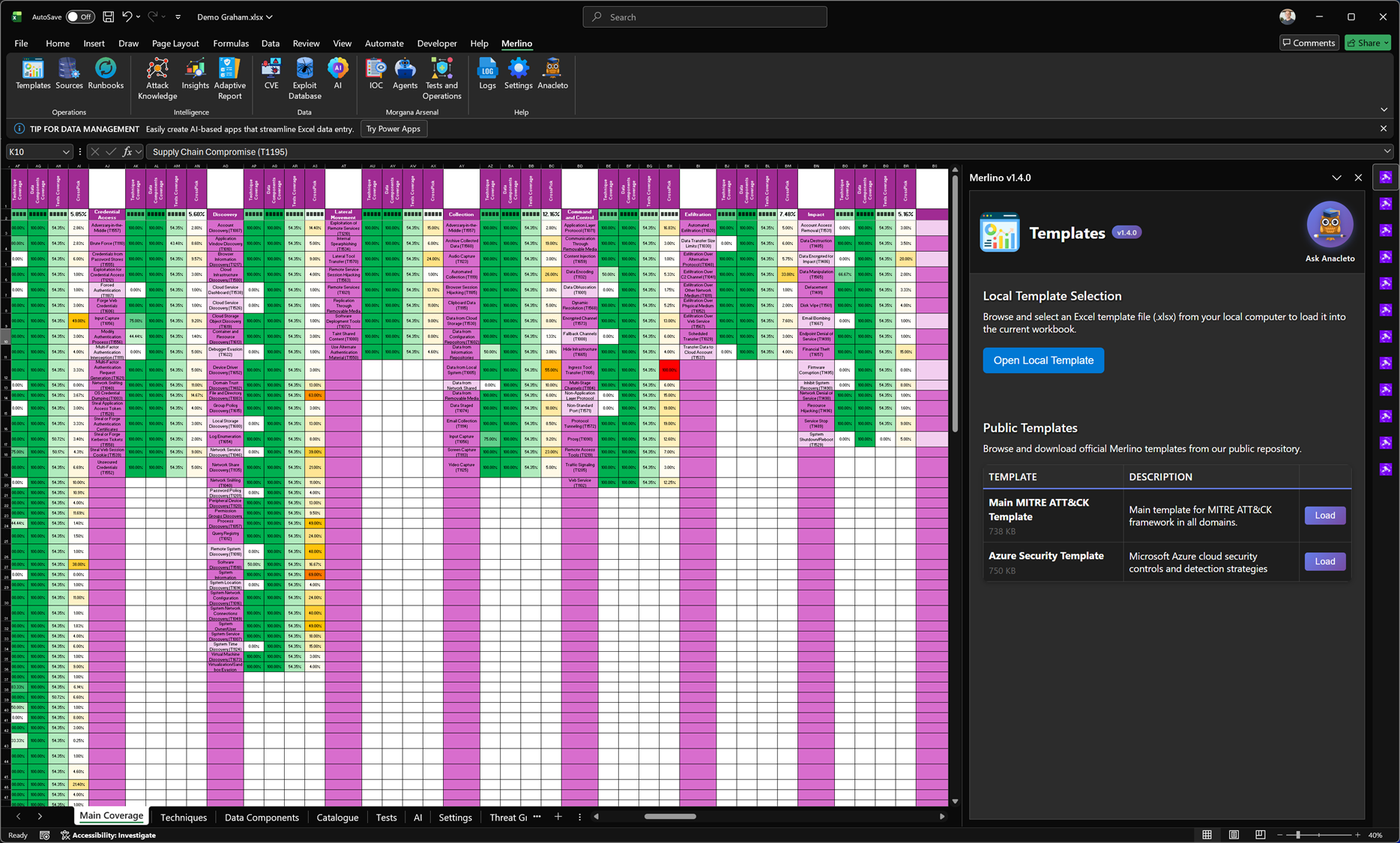
Templates (MITRE Posture Baseline)
The Templates feature is the fastest way to bootstrap a complete Merlino workbook using a curated, ready-to-use Excel baseline. Templates provide a structured starting point for MITRE ATT&CK coverage and posture, so you can move immediately from an empty workbook to a measurable, working framework.
Merlino templates are not static spreadsheets: they are designed to be the foundation of an operational methodology, enabling consistent assessment, validation, and reporting.
What this module does
-
Load a complete MITRE posture baseline in seconds
Templates include a pre-built MITRE ATT&CK framework structure (domains, tactics, techniques) and the core worksheets Merlino expects for posture and coverage workflows. This allows you to start mapping and measuring without building the workbook manually. -
Standardise posture across teams and customers
Using templates ensures everyone starts from the same structure and terminology, reducing ambiguity and making results comparable across environments, projects, and reporting cycles. -
Enable coverage-first workflows
Templates are designed to support a posture-driven approach:- identify coverage expectations
- measure detection and telemetry alignment
- highlight blind spots
- drive validation and continuous improvement
Template sources
Local Template Selection
Use Open Local Template to load a .xlsx template stored on your computer.
Use this when:
- you maintain customer-specific baselines
- you have an internal, versioned template
- you want to start from a customised workbook layout
Public Templates
Merlino also provides official templates from a public repository, downloadable directly from the interface.
Typical examples:
- Main MITRE ATT&CK Template – a comprehensive baseline across all ATT&CK domains.
- Azure Security Template – a baseline focused on Microsoft Azure controls and detection strategies.
How it works (user flow)
- Open Templates in the Merlino ribbon/panel.
-
Choose one of the following:
- Open Local Template (load from your machine), or
- Load a Public Template (download and open).
- Merlino loads the selected template into the current workbook.
- The workbook becomes your starting point for posture assessment, technique mapping, test planning, and reporting.
What you get after loading a template
Once loaded, the workbook contains a structured baseline enabling:
- MITRE ATT&CK posture view (coverage by tactic and technique)
- consistent worksheets and navigation for Merlino modules
-
a foundation for adding:
- detections / analytics mappings
- data sources and telemetry coverage
- tests (manual, external, or Morgana/Caldera-driven)
- evidence and reporting outputs
Best practices
-
Version your templates (e.g.,
Merlino-MITRE-v1.4.xlsx) to keep assessments repeatable. - Use the Main MITRE ATT&CK Template for general posture baselines, and a domain-specific template for focused assessments (e.g., Azure, endpoint, identity).
- For customer work, start from a template and then tailor the workbook rather than building one from scratch — this preserves consistency and speeds delivery.
Notes and limitations
- Templates define the baseline structure; actual posture and coverage results depend on your mappings, telemetry, detections, and validation inputs.
- Public templates may evolve over time; for regulated environments, store and use a local, versioned copy to ensure repeatable assessments.