
Tests & Operations
(Error Analytics)
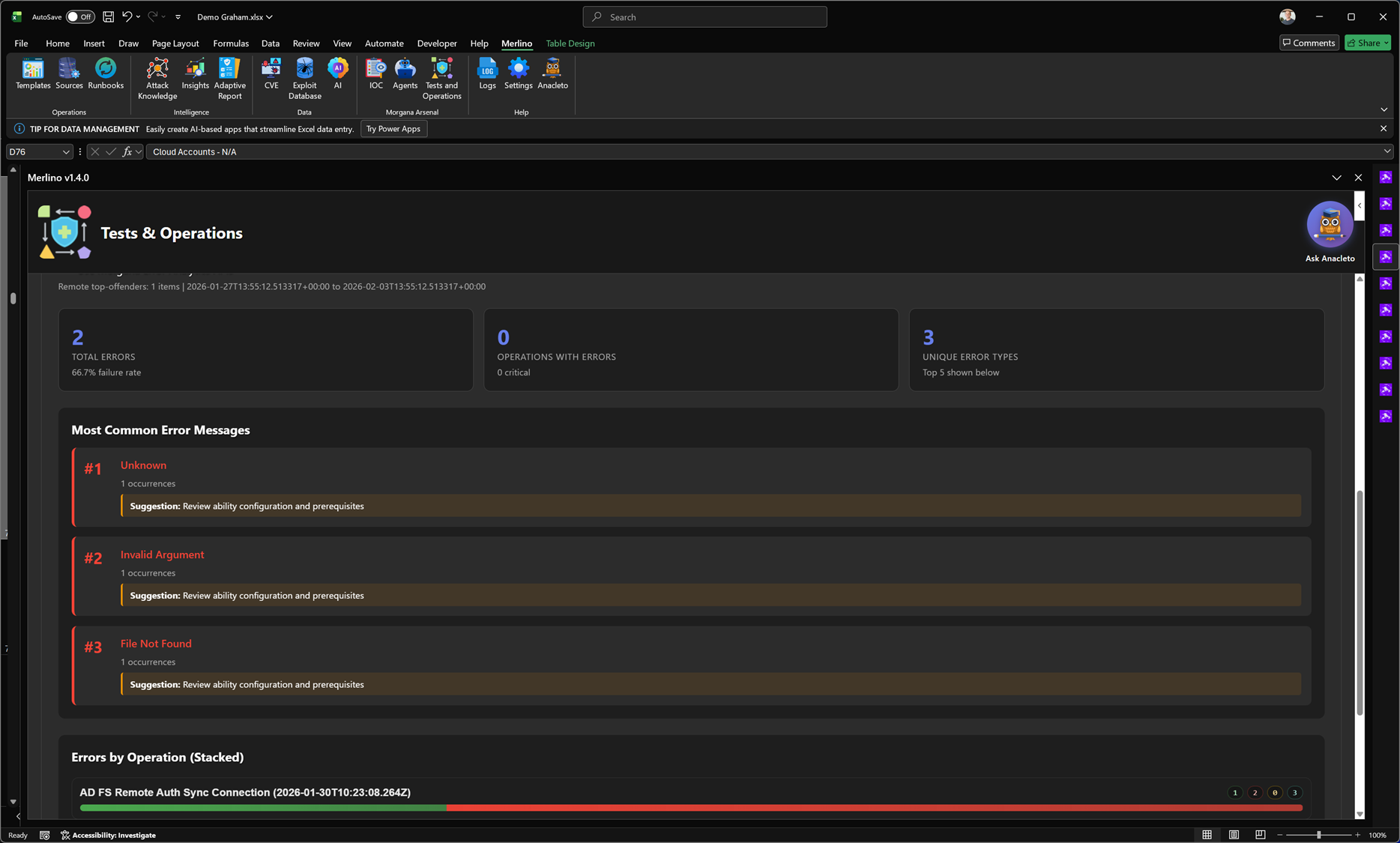
Tests & Operations (Error Analytics)
Error Analytics is the troubleshooting view for Tests & Operations. It consolidates execution failures across Morgana (Caldera) operations and turns raw error output into actionable signals: what is failing, how often it fails, and where the failures concentrate—so you can restore stable, repeatable execution quickly.
Purpose
A single failed run can be meaningful, but repeated failures often indicate a systemic issue (prerequisites, agent health, permissions, missing files, incorrect parameters, or environment drift). Error Analytics provides a structured way to separate noise from patterns and drive fixes that improve the reliability of the entire validation pipeline.
Summary statistics
The top section provides an instant health snapshot of errors within the selected time window:
- Total Errors: the number of execution errors captured across all in-scope operations.
- Operations with Errors: how many distinct operations generated one or more errors.
- Unique Error Types: how many different error categories/messages were observed (useful for scope and triage).
Most common error messages
The report ranks errors by frequency and highlights the most common messages first. Each item shows how often it occurred and can include a short guidance hint to accelerate remediation (for example: review ability configuration and prerequisites).
- Error ranking: quickly identify the top error types driving failure rates.
- Occurrence count: understand whether an error is isolated or systemic.
- Action guidance: a suggested next step to validate prerequisites and configuration.
Error distribution by operation
Error Analytics includes a breakdown that shows how errors stack per operation. This is critical for distinguishing: operations that fail due to a local issue (single operation) versus failures that propagate across multiple operations (systemic issue).
- Errors by Operation (stacked): visualize where error volume concentrates and which operations are most affected.
- Hotspot detection: identify operations that dominate the error landscape and need immediate attention.
- Trend tracking: compare error frequency before and after fixes to confirm improvement.
How to use it (recommended workflow)
- Start from the top errors: fix the most frequent error category first to maximize impact.
- Validate prerequisites: confirm agent state, required files, permissions, and connectivity for the affected abilities/tests.
- Check scope concentration: determine whether failures are isolated to a specific operation or broad across the environment.
- Re-run operations: execute again and confirm that error rate drops and success rate improves.
- Restore confidence: once stable, rely on outcomes to support coverage validation and reporting.
Why it matters
Error Analytics protects the integrity of your validation process. It reduces time spent chasing individual failures and accelerates stability improvements so that success/failure outcomes reflect real defensive posture rather than test fragility. This makes coverage claims more defensible and trend tracking more accurate over time.
Note: Error Analytics is synchronized from Morgana (Caldera) execution data. As operations run more frequently, the report becomes more representative and increasingly useful for reliability engineering and continuous validation.