
Tests & Operations
(Performance Report)
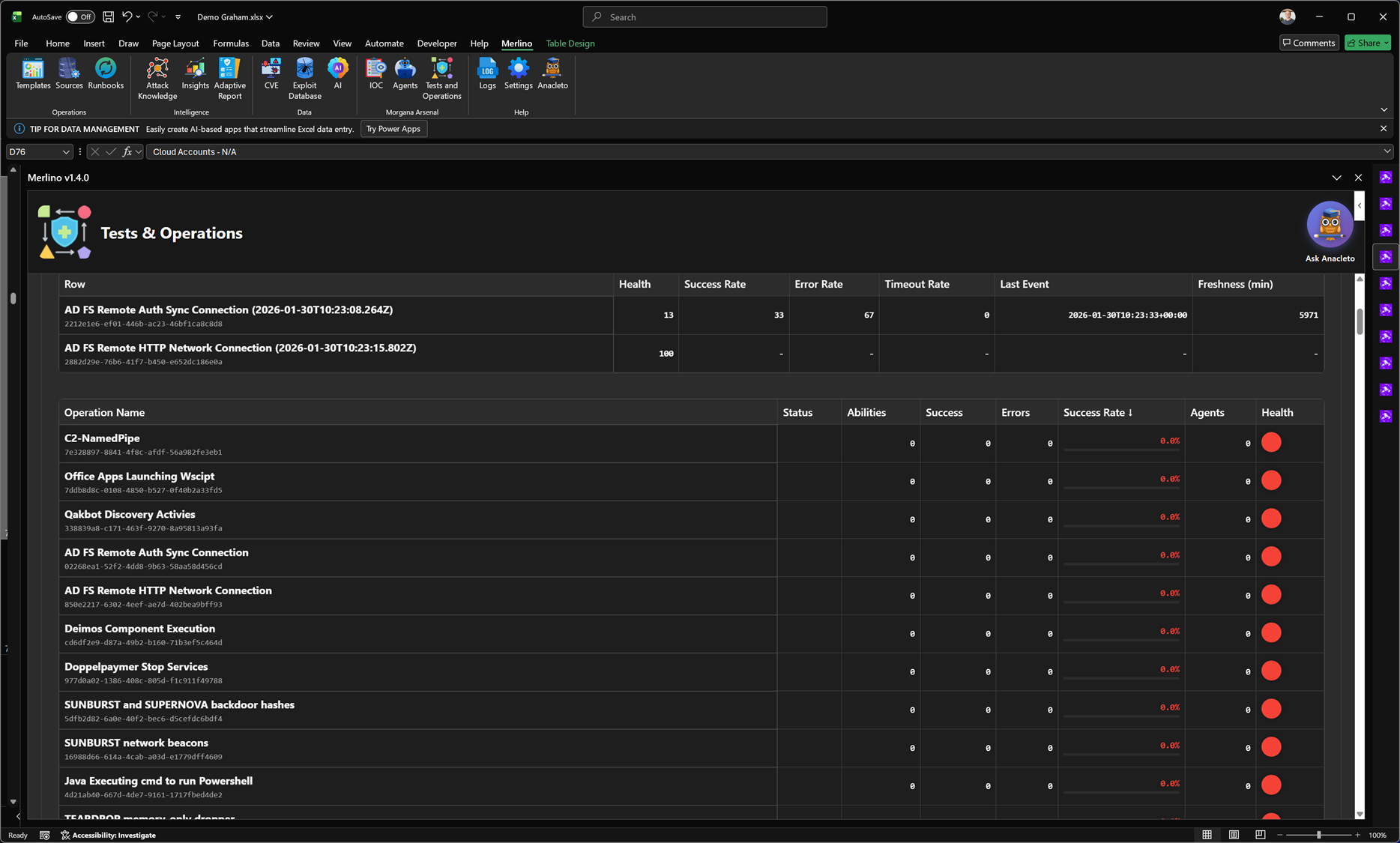
Tests & Operations (Performance Report)
The Performance Report gives a real-time operational view of execution quality for your red teaming and adversary emulation runs. It aggregates success, errors, and timeouts per operation and surfaces health signals, recency, and freshness so you can quickly understand which operations produce reliable evidence and which require attention.
Purpose
Coverage metrics are only meaningful if the underlying execution is reliable. The Performance Report focuses on the operational integrity of your test runs: it highlights stability, repeatability, and failure conditions so you can trust the results that feed posture statistics. This is the dashboard you use to monitor execution quality before using outcomes for validation decisions.
What the report tracks
The dashboard summarizes performance per operation and across operations. It is populated from Morgana (Caldera) execution data and synchronized into Merlino for consistent analysis and reporting.
Execution health and reliability
- Health score: a consolidated signal that reflects execution reliability based on recent outcomes.
- Success rate: percentage of successful executions within the evaluation window.
- Error rate: percentage of runs that failed due to execution errors.
- Timeout rate: percentage of runs that did not complete within expected execution time.
Recency and data quality
- Last event: timestamp of the most recent execution signal for the operation.
- Freshness (minutes): time elapsed since the last event, used to detect stale telemetry or inactive operations.
Operation list and drill-down readiness
Operations are displayed in a structured list to allow fast triage. You can scan the table to find the operations with the lowest success rates, highest error/timeout ratios, or outdated freshness. This enables targeted remediation: fixing unstable tests, tuning timeouts, addressing agent issues, or adjusting execution scope.
How to use it
- Scan health: identify operations with degraded health or low success rate.
- Check failure type: differentiate between errors (execution issues) and timeouts (performance or connectivity issues).
- Validate recency: confirm that the operation has recent execution events and is not stale.
- Improve reliability: tune tests, fix agent stability, adjust operation design, then re-run and observe uplift.
- Trust evidence: only use outcomes from stable operations to support posture and coverage conclusions.
Why it matters
The Performance Report turns adversary emulation into a measurable operational process. It prevents false confidence by exposing unstable operations and ensures that success/failure outcomes reflect real control effectiveness rather than test fragility. This improves the quality of evidence used for coverage validation and makes reporting defensible.
Note: Performance metrics are synchronized from Morgana (Caldera) into Merlino. As operations run repeatedly, the report becomes more accurate and more useful for trend tracking and reliability improvement.